Adam Savage’s “Sunday Sermon” at Maker Faire 2017

I’m growing more and more certain that everything Adam Savage touches turns to gold, even the things that fail spectacularly.

For years, now, Mr. Savage has been giving a  short talk at the annual Maker Faire. They are full of inspiration, encouragement, and awesomeness. This year’s talk is no different.

The giant ant he rides in on is a bit of a bonus.

Why This Site Is Self-Hosted

Sites like Facebook, Twitter, Tumblr, Flickr (the list goes on…) are (or have been) extremely popular, in part because they’re free, but also because they’ve reached a “critical mass” of users. I know many people who only use Facebook because their friends and family use Facebook, for example.

Separate from this is a trend known as POSSE, or Publish (on your) Own Site, Syndicate Elsewhere.

Like it implies, following a POSSE strategy doesn’t forego having and using the free social media sites that are so hip with the kids these days, particularly the ones who don’t describe neato things with the word “hip” (or “neato,” for that matter…). Instead, you put your meaningful content on a site you host yourself, then link to it on those networks.

I like this plan. Here’s why.

Here today, gone tomorrow.

A sizable portion of the things I have made were uploaded to services that no longer exist. Remember Geocities? Mac.com web hosting? Tumblr is still around, but I apparently went so long without using it that an older account of mine was deactivated and resurrected by someone spamming ads for real estate.

We assume when we create an account on a free service that it will stay online forever, or at least until we’ve lost interest. Those of us with more gray hairs know that this is simply not the case. A lot of people today are mourning the loss of Vine, but it’s far from the first to go and certainly won’t be the last.

(Side note: My wife did all her blogging on a Tumblr account. I’m going to have to find a way to preserve that somehow.)

You’re the product.

I’ve heard “If you’re getting a service for free, you’re not the customer, you’re the product” so often that it almost loses meaning now. Unfortunately, it is frequently true.

Google doesn’t make money hand over fist because they’re selling physical items or search results, they’re making money because so many people see the stuff they do that buying ads from them is cost effective. (I say this knowing full well that some pages on this website include ads  from Google. I didn’t say all advertising is bad.) The same is true for Facebook. Twitter is … working on it, but they have a problem still with bots and harassers so their store of products seems a bit tainted to prospective buyers.

I pay a company for server space. Because that’s their product and keeping me happy is the best way to keep me sending them money, they work hard to do so. On a free service that is mostly depending on ad revenue and/or data collection, the people they want to make happy are the ones sending them money.

This happened recently on YouTube, where advertisers got particularly annoyed when their ads started showing up in front of incredibly offensive content. As a result, YouTube has seriously cut back on which videos can be monetized. So far, so good, right? Yes, except the algorithm isn’t as fine-tuned as it could be, and now non-bigoted people (I’m assuming, but I like to assume the best when possible) who depend on YouTube ad revenue to pay their rent are a bit concerned about their drop in income.

I like YouTube. It’s where I post all of my tutorials as well as my more recent conference presentations and vlogs, but I wouldn’t depend on it for my income even if my channel subscriptions went through the roof because I’d be relying wholly on a company NOT designed or motivated to keep me happy meeting my needs. (I’d also be squeamish about forcing my students to watch tutorials that make me money. The channel I use to host my tutorials is currently not set up for monetization. If you see ads, the revenue isn’t going to me.)

Self-hosted content is (more) mobile.

I said before that I like my web host. I do, but if I somehow change my mind it would take only a little bit of work to back up this entire site with YEARS of content and move it to another host. There are a few other companies that do that, but it isn’t universal and it isn’t always easy.

Google is one of the few, which is part of the reason I was able to move from Blogger to WordPress without copy/pasting blog posts by hand.

Flickr theoretically has an option for downloading all your photos, but the last several times I tried it didn’t work. If I had been uploading all my photos to a self-hosted site instead of Flickr, I wouldn’t be so concerned about this.

Twitter allows you to request an archive of all of your tweets.

I haven’t seen anything on Facebook or their subsidiaries (Instagram, etc.) allowing you to download all of your content from them.

Vine offered this, but they’re gone now.

You don’t need to leave, but a permanent home would be good.

This entire post was inspired by Doug Belshaw’s post about why he’s “leaving” Twitter. I use quotes because he’s not abandoning Twitter like I abandoned my old nameless-to-not-support-a-spammer Tumblr account. Instead, he’s switching strategies.

To Mr. Belshaw, the Twitter of yesteryear was a place where he had conversations. Now, it will be a place where he uses a bullhorn to tell followers about the cool stuff he’s doing elsewhere. It’s a viable use for the medium, and many people use Twitter for mostly that anyway.

“But blogs are for long form content, not rapid-fire ephemeral but public communication,” you might counter. “Surely he’ll continue to use Twitter for that.”

Eh, Twitter’s not the only option for that, either.

(I’m on Mastodon as well, if you want to follow me. UPDATE: I found an academics themed instance and I’m giving that one a try.)

(Also, if you want to try self-hosting and help support this blog at the same time, try Dreamhost. If you don’t like clicking affiliate links, here’s one to Dreamhost that doesn’t support me at all.)

5(ish) Photography Lesson Ideas

Lesson ideas:

  1. Take 100 unique shots of the same item and/or in the same location. (The first 50 or so will likely not be so good. After that, students will be forced to think.)
  2. Photograph something being made (Lego sculpture, a meal, a painting, etc.) with the camera in a different location in regards to the subject in each photo.
  3. Document an outside (not in a car) journey from the point of view of your feet. Capture as many landmarks/areas of interest as possible.
  4. Create a series of images where the subject is only seen in reflections (mirrors, windows, still water, etc.), bonus points if it is interacting or lining up with the non-reflected parts of the composition.
  5. Watch the video below for inspiration.

PICO-8 Progress

It’s been a few days since I  started messing with creating content in PICO-8, so I thought I’d document my journey so far through the magic of bullet points.

  • There’s a programming cheat sheet.  This helps.
  • There’s also a more detailed manual online,  if you want to know everything.  (This might not be the best starting point, though.)
  • YouTube Video tutorials abound, though the language in some is not safe for school. I will likely make my own tutorials once I feel I have enough skill to do so.
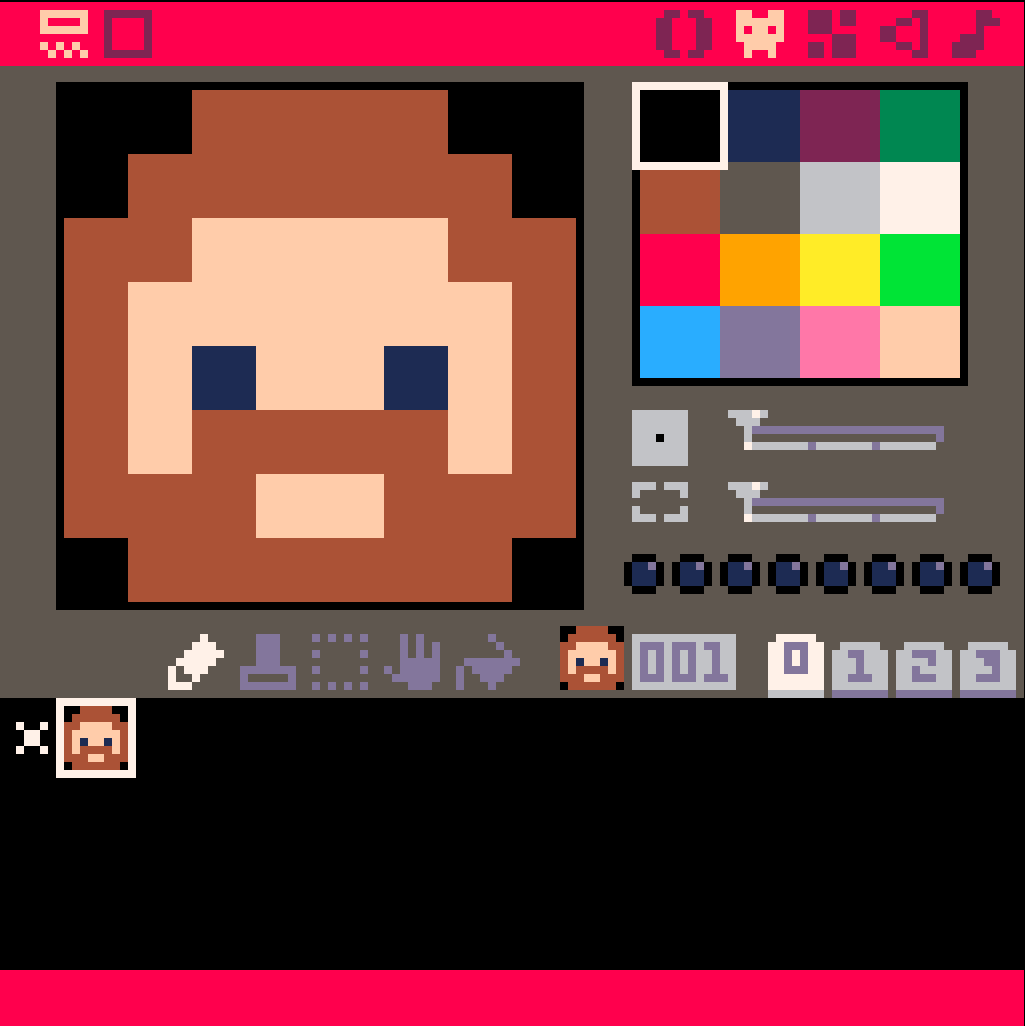
  • Pressing F9 to save 8 seconds of an animated GIF to your desktop is a really neat feature that I will probably be using more than I should. (The images aren’t large by default. The GIF in the corner here is shown full size.
  • This is definitely something my students are not going to understand fully on the first day.
  • This is something several of my students are going to love.
  • I got caught up in the sprite editor at first. I shouldn’t have. You can do all kinds of cool things without sprites at all. Start there.  The sprites are nothing without the code. The code can do plenty without the sprites.
  • I have 10% of an idea of what I’m doing, and I love it. This is my kind of learning – I am outside my comfort zone, but not by such a large margin that I’m afraid to see what changing a parameter does.
  • The “Undo” shortcut of Ctrl-Z works, and it is a lifesaver. Also:  Copy & Paste work as intended.
  • Programming is an algebra teacher’s answer to the age-old question of “When are we going to need to know this?” Only in this case, you’re telling PICO-8 to plot X and Y and oh, wait, now change those numbers to this and keep changing them and use  those numbers as the modifiers for changing themselves and no, you’re not plotting a line graph, I want a new image each time.
  • This is fun.

More updates as I do more.

It Shouldn’t Be Hard(er)

Taking a short break from long blog posts to give you this little tidbit I’m fond of saying.

Note that this doesn’t specify who’s doing it wrong. Sure, it MIGHT be you, but it might be a student, administrator, or even the person who designed that bit of technology in the first place.

Come to think of it, that last scenario has occurred more times than I’m willing to talk about.

In any case, it has a kitty in the background.

Getting Homework to Work, Part 2

Yesterday  I started documenting my efforts towards making homework enjoyable enough for my students to actually do it for a change. By the end of that post I’d set up a weekly assignment where students made a video series as if they were YouTube stars. There was a definite increase in participation and quality, but I wasn’t quite done.

Binge Watching Isn’t So Bad.

I started by taking all of the homework videos submitted over the previous week and throwing them in a folder in Google Drive. My district uses G Suite (formerly GAFE, or Google Apps For Education),  so I’m one of those lucky ducks with unlimited storage space.
In the past I’d tried tossing them all into a playlist and showing them in class on my LCD projector, but with a 1:1 ratio in my lab there was nothing stopping me from letting students watch and critique these videos at their own pace.

For convenience I also renamed all the videos following a specific naming convention. If John Doe submitted a 2 minute 11 second video for the 3rd video in his series, I named it 3_JD_2-11.mp4. This was a marked improvement over the previous names, which ranged from “My Edited Video” to “12345.mov” … I wasn’t grading students on how they named their files, so long as they uploaded the right ones.

With all the videos in a folder that I could share through Google Classroom, I was almost ready to go.

Will This Be Graded?

It doesn’t matter how enjoyable an activity you design, there will invariably be someone who asks if it’s going to show up in your grade book. I personally have an aversion to assigning “busy work”  because  I end up making myself busier as I grade something that was meant to be filler, but  there’s still that student, as dependable as death and taxes, that will ask if THIS time I’m giving them work that doesn’t matter.

Nope, it’s not enough to do things out of the goodness of your heart, you need numbers to go with it. Numbers I am happy to provide, in fact, so long as you give me a few in exchange.

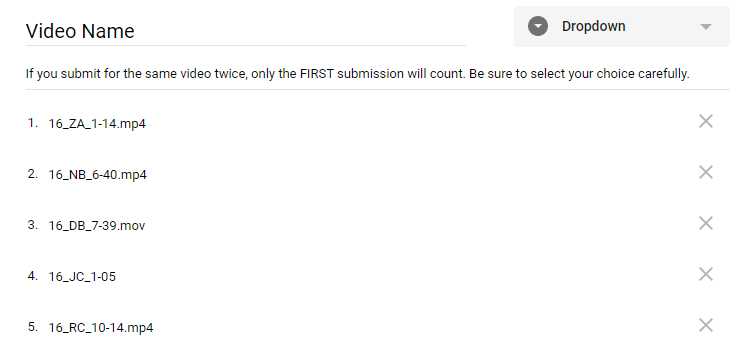
I took all of the renamed videos and put them in a Google Form. I made it a “Dropdown” question, since otherwise my students would be scrolling for days.

(Pro Tip: If you don’t want to type everything in, you can’t select text in Google Drive’s web interface but you CAN  tell your browser to print the page. When the preview shows up, DON’T press the print button – the text in the preview page  can be selected, copied, and pasted into a Google Form. You’ll get some extra lines you’ll need to delete, but that’s easier than typing everything by hand.)

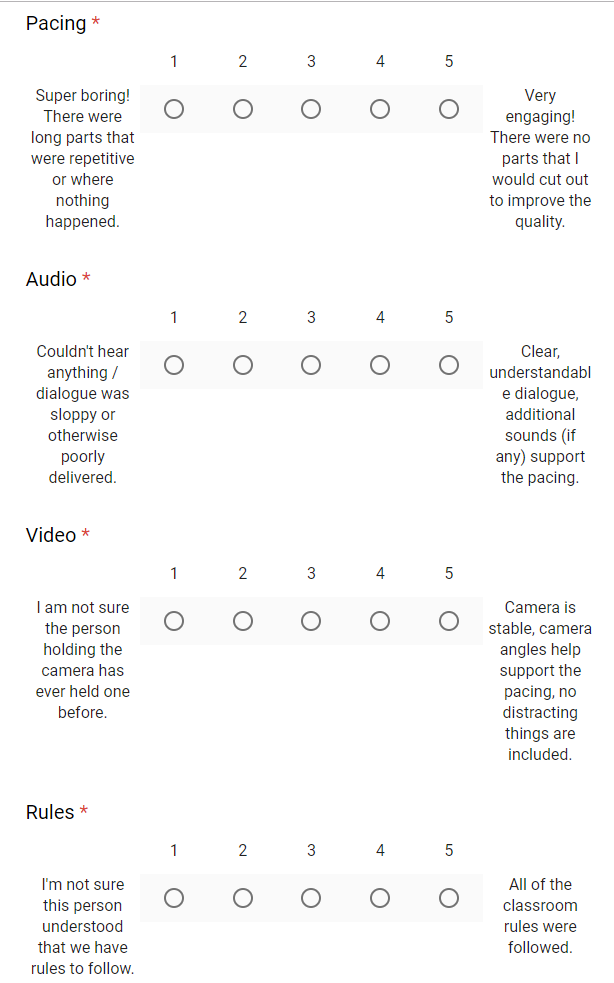
Then I added four “Linear Scale” questions that my students would use to rate the videos they watched. We’d already talked in class about these categories, so they were familiar with   them and didn’t need much in the way of explanation.

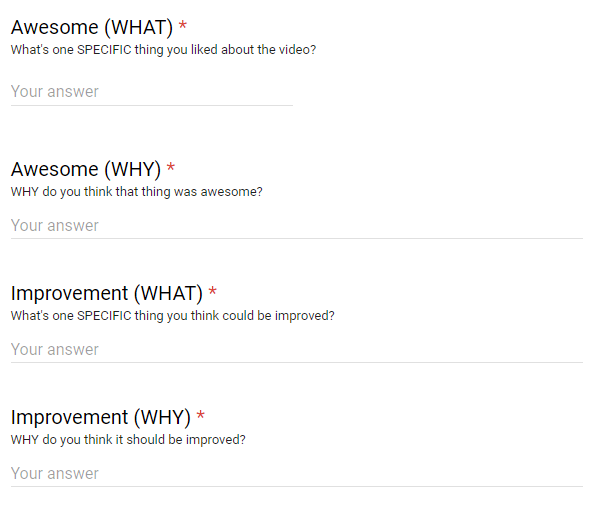
I capped it off with “Short Answer”  questions that allowed students to offer some criticism.

After the critique is over I  find the average for each category and then add the four categories up to get a score out of a possible twenty points. Critics get a score as well, earning one point for every three minutes of video graded.

Testing Boundaries

Of course this  has not always gone smoothly. There have been students that thought single word critiques, or pasting in the same sentence for each critique, were acceptable. One day when I was absent half the class invented time travel and managed to critique all the videos in  a tenth of the time it took to watch them.


I caught those students, because timestamps are a thing and I refused to treat this like something meant to save ME time and energy.

I’ll say that again: Letting students grade and critique student videos IS NOT faster than grading them myself.  I still have to watch the student videos  (why wouldn’t I?) and if anything I spend more time grading critiques than I did grading videos. I’m sure as I keep doing this I’ll find ways to streamline the process, but that doesn’t mean I’ll have more time for video games afterwards.

Keeping What Works

The goal was to get more students to start submitting their homework videos, and it’s working. My kids, with some exceptions, like writing comments when they know their classmates will read them. They like making movies when they know their classmates will write comments.

But what about the grades, you might ask? Won’t the students just give each other 5/5 on everything? There are a few that give incredibly high scores regardless, but with anonymous grading (on the student end – I see everything) and a class my size, it mostly averages out. Even if they did collude to give each other high marks, my homework grades are mandated by my district to count significantly less than my assessment or classwork grades.

Overall the scores are SLIGHTLY higher than what I’d give using the same rubric, but well made   videos still score higher than lower quality ones.

And they’re   getting better.

As a member of their audience, my students can take me or leave me. I’m far too old and out of touch with today’s youth for my opinion to mean much. But their peers? Those are opinions that mean something, and I’ve given my students enough training for them to point out what areas of technique need improvement.

So there you go. Your mileage may vary, but this setup seems to be working for me. All it costs is one class per week for critique and a significant portion of my planning time to organize and grade the  commentary, but the end result is students getting better at something they actually like to do.

That works for me.

Getting Homework to Work, Part 1

I mentioned in a previous post that I’ve been experimenting with letting kids grade student work. The whole journey will take more time to tell than I feel comfortable putting in a single blog post, so I’ve split it into parts. I’m not at a point where I’d say I have a perfect system, but then show me an educator who does.

If you don’t want something done, call it “Homework.”

It all started with my homework. All year, my Media Arts students have been tasked with creating one video per week in addition to any in-class projects I assign. I try to create assignments with enough creative freedom for students to bend them to their will.


Each homework assignment needed to be a   short (1-3 minute) video with a “hook” that they all needed to have in common. “This video should have an argument.” “I want this video to have two different settings, each designated with an establishing shot.” The goal was to give a mote of detail (frequently a cinematic technique I wanted them to practice)  around which the student could condense their  plot, making it less likely for anyone to be able to say “I couldn’t think of where to start.”

But this was still homework.

And middle school students, as I’m sure you know, have an aversion to homework.

It’s not all their fault, mind you. Teachers in most classes give a significant amount of homework every night in the name of “rigor.” Imagine, if you will, that a student has 5 classes per day, and that each class on average assigns an hour’s worth of homework per night.

I don’t know about you, but my school doesn’t finish dismissing students until after 4pm. Assuming that they live close to school (which many of my kids don’t, since it’s a magnet school), they won’t be done with their homework until 9pm, assuming they work through supper. This barely gives them any time to be kids, rather than students.

Unless they prioritize, and skip some of their homework.

I don’t think it’s that students disliked my homework. I think that they didn’t like it enough to  prioritize it over assignments from other subjects that may have been more important for their grades.

In the past I simply bypassed all of this by not assigning any homework at all, but the overall quality of student work went down as a result. My students don’t need my homework to boost their grades, they need it to boost their skill level through practice and repetition. Telling them this doesn’t always get results, because that 4 page paper for another class is worth a lot more than my work. I can’t bump up how much my homework is worth in a bizarre teacher versus teacher arms race, either (even if I wanted to), because my grading percentages are mandated on the district level.

If you want something done, make it something that would’ve been done anyway.

My first step was to play up student interests. I already knew, through conversation, surveys, the audition process, and looking over students’ shoulders when they were supposed to be working on something else, that the majority of my Media Arts majors are obsessed with YouTube.

(My class has a focus on video and is intense enough to require an audition. If they didn’t like YouTube, I’d be worried.)

At the start of 3rd Quarter, I made a change to the homework. The weekly “hooks” were gone. Instead, students had to format their remaining 18 videos as if they were all part of a YouTube channel’s series. They needed an opening segment and a theme that they would pick and keep with for the rest of the year.

Some students picked a video game theme, of course. One of them is doing DIY craft videos. Another is doing weekly challenge videos, guest starring various family members. One young lady is doing weekly book reviews.

Due to their age I did not require them to make these videos into actual YouTube channels, but several of them actually got their parents’ permission and did just that.

And you know what? It really helped. I had students who were hit and miss in regards to completing homework start handing it in every week. Overall the quality of classwork assignments went up as students began to master the video editing software of their choice.

It was working, but not well enough for my standards.

We were missing something crucial that every aspiring YouTuber craves.

An audience.

In my next post, I’ll explain how I added one.

Teaching Criticism With Spam

In the near future, I’m going to be sharing some spam with my students, and not for the reason you’d think I’d do it. While teaching how to tell the difference between actual important emails and unsolicited commercial and/or malicious emails is important, that won’t be the primary goal.

In addition to everything else I teach, part of my curriculum involves criticism. We as a culture of consumers frequently elevate critique itself into an art form – one so high that we generalize its practitioners into a league of toga-clad experts, giving thumbs up or down as various creative works battle it out in their arena. (The critics loved it! The critics panned it! The critics said it wouldn’t do well but look at the box office numbers, so what do they know?!)

You might think that things are different now that there are services that crowd-source ratings, and you’d be right. Rotten Tomatoes and Yelp are the first that come to mind, but Amazon’s reviews and YouTube’s Like and Dislike buttons also come in to play here.

Unfortunately, not all crowd-sourced criticisms are created equal. The goal of my upcoming lesson will be to improve how well my students articulate themselves when critiquing things they like or dislike.

The main example I intend to show will be a little gem from this very blog’s spam filter:

Seems like a nice bit of commentary. I mean, they’ve told me I have room for improvement, but they lead with something nice to say so the comment seems thoughtful and well-rounded.

What’s my point?

Guess which post they were commenting on.

This comment could more or less be attached to any of my posts where I explain something and still have it mostly make sense in context. There’s nothing in here to show that the person who wrote it actually read anything on my blog other than the tag line, and that we can only guess because their name and web address (which I censored since I’m not giving their college loan site free advertising) have something to do with education. OK, it was probably a bot that posted, but technically the bot still reads key words.

This is a common attribute for spam, but this is not something I expect from students.

I’ve recently ramped up the amount of time spent doing peer critiques in my Media Arts classes. The main setup is the subject of a blog post for another day, but one of the hurdles we have to navigate involves generic criticism.

It’s all well and good to say that you liked a video. It’s also OK if you say you didn’t like it, since not everyone has the same tastes.

But neither of those opinions works well in a critique setting if you don’t say WHY. The more my students dig down into their reasoning, the less likely they are to give criticism that would get caught in a spam filter.

That’s the goal, anyway.

We’ll see how well it works.

Game Design With PICO-8

The more time I spend on Mastodon, the more I like it. It reminds me very much of the pioneer days on Twitter, but without  all those issues of @ signs meaning nothing, retweets being something we had to copy/paste, not having a decent phone app…

Never mind that.  Mastodon isn’t even the subject for today’s post. I only bring it up because today’s little gem comes from something  I saw ON Mastodon.

I was intrigued, so I went and looked it up. Apparently PICO-8 is like getting an old-school Atari 2600 for $15 that runs on Mac, Windows, & Linux,  but with user made games.

…And a built-in game design engine. With the ability to edit game music as well. And purchasing it also gives you a site license for your school. And students who want to use it at home can buy it at a discount.

No, really.  This is on their own website:

Every copy of PICO-8 comes with a site-wide license for an entire school, workshop or other similar educational space. Discounted take-home licenses for individual students are also available.

Naturally, I was intrigued. Since it comes free with  their voxel based game Voxatron, I bought that for $20 and got PICO-8 tacked on as a bonus download. I immediately loaded it up,  typed “help” to see the menu, entered the editor…

… and had no idea what to do from there.

I mean, I know you can code behaviors with the LUA programming language, but the rest of it reminded me of the first time I opened GIMP and wondered what all the buttons did.

It was glorious.

I’m not going to say that I will master PICO-8, but I’m not going to say that I won’t learn it at all, either. It’s something new, the games people are making with it are interesting, and should I learn enough about it to feel comfortable, you can bet I’ll be sharing it with my students next year.  The install file for it is literally  small enough to fit on a floppy disk, so I know getting it to run on my older lab computers (the ones that crash when exporting HD video) shouldn’t be an issue.

And who knows? Maybe next year, one of my students will use PICO-8 to record their own homebrew machinima for our county Film Festival. The rules about trademarks prevent most forms of videos made of recorded gameplay, but if you make the game yourself, that should be an easy way around the problem.