MICCA09 Session 1 Plurk Log

theartguy Session 1 is What Google Can Do For You by thetechtiger! Woot!

  • April 21, 2009 at 10:11 theartguy says im.textthemob.com/id751
  • April 21, 2009 at 10:32 miz mercer Back to being artguy I see
  • April 21, 2009 at 10:38 theartguy says For now at least – don’t want to confuse the people I introduce to PLNs today.
  • April 21, 2009 at 10:39 theartguy says Currently explaining Gmail & Gchat
  • April 21, 2009 at 10:43 theartguy says It’s all a quick overview of everything right now. Cal, Docs, Maps, Earth
  • April 21, 2009 at 10:44 bethmharvey says I love the site “text the mob” I have never seen that. Good luck on your presentation. Our teachers are most interested in Google Docs
  • April 21, 2009 at 10:45 theartguy says “If you can use Office, you can use Google to make web pages.” So true :)
  • April 21, 2009 at 10:47 theartguy says Best part about Google Docs is no more thumb drives to transfer documents. IMHO
  • April 21, 2009 at 10:47 theartguy says Side note – this isn’t a PowerPoint. WHole thing is in prezi.com/
  • April 21, 2009 at 10:49 theartguy says Google Groups – discussion boards. Can be public or private. Lots of good ones already exist.
  • April 21, 2009 at 10:52 theartguy says iGoogle
  • April 21, 2009 at 10:56 theartguy says Overview done, now for the nitty gritty!
  • April 21, 2009 at 11:02 theartguy says Form – create a web based survey (or quiz or test!) and all answers are placed in a spreadsheet! I use this all the time and it’s awesome.

MICCA 09 Keynote Plurk Log

theartguy Keynote for Day 1 is Karen Cator from Apple. Lots of good ideas, though many are common amongst keynoters.

  • theartguy says Web 1.0: Watch Tv and try to understand commercials.
  • April 21, 2009 at 09:15 theartguy says Web 2.0: Produce media
  • April 21, 2009 at 09:17 theartguy says “Get out of the notion of giving kids something to do every 20 minutes.” They need to manage their own time.
  • April 21, 2009 at 09:18 theartguy says “When you want to learn something new, what do you do?”
  • April 21, 2009 at 09:22 theartguy says Showed a video of a 10 yr old video blogger. Kid mentioned a JoCo song. Nice :)
  • April 21, 2009 at 09:22 techtiger I really liked that kids are the CEO of their own brand
  • April 21, 2009 at 09:24 theartguy says Enabling trends: Mobility – 24/7 access & user created content.
  • April 21, 2009 at 09:26 theartguy says Indeed, thetechtiger – It was rather “permanent record”-ish, but in a good way.
  • April 21, 2009 at 09:27 theartguy says Also enabling: Social Interactions for Learning. Social interactions are PROMOTING learning.
  • April 21, 2009 at 09:34 theartguy says And just got a link from timholt about being a Keynote speaker.

Help me at MICCA!

09confwebbanner2

For the 4th year in a row, I will be presenting at MICCA.

For the 1st time (for this conference, at least…), I will be presenting twice.

And as usual, I’m opening my handouts up to everyone who wants to add in their two cents.  I feel they’re ready to go as-is, but that doesn’t mean I’m the only person who knows what he’s talking about!  (I’m hoping for supplementary information, not for someone to do the work for me.)

My presentations are as follows.  Click the links to see, edit, and/or add to my wikis:

Art 2.0

…how art lessons in the computer lab can reinforce other subjects.

Paper, pencils, and paints are good, but there are also plenty of free art projects that reinforce other subjects and can be taught using just computers. This session will showcase some tools, tips, and tricks that any teacher can use.

Personal Learning Networks

…how microblogs and more can make you a better teacher.

Personal learning networks (also called professional learning networks) are a quick, easy, and free way to continue your professional growth as an educator using web 2.0. This session will explain PLNs in more detail and show a variety of free sites that can be used to build your own.

Don’t mind the shavings.

Garbage never looked so good.

I handed colored pencils to my 1st graders today.

This was not too surprizing, as I did the same thing last week.  What I have noticed, however, is that most of my teachers with younger students don’t let them sharpen their own pencils whenever they need to.

I, however, do.  I would much rather see a student raise their hand because they’re having difficulty with a portion of their composition  than because their colored stick isn’t pointy enough.  As a result I usually announce in the beginning of the lesson that if the pencil needs sharpening, they can just get up and sharpen it.  I even go so far as to explain when a pencil needs sharpening and how to sharpen it so that it doesn’t disappear forever in a pile of shavings.  (Colored pencils are much softer than the 2B kind.)

You know what happens next…

Stampeeeeeede!
Stampeeeeeede!

That’s right, any student who found a colored pencil that was not ready to vanquish a vampire was at the sharpener ready to go! This included those who had white colored pencils.  Did I mention this was a lesson where they used white paper?  Well it was.

This is the point when the classroom teacher looks at me with a patronizing expression that says “That’s why I don’t let them do that.”

And I look at them with a nervous smile that says “Eheheheh … I’ll be right back.”

The next minute or so is spent turning kinds away that don’t really need to sharpen pencils, as well as enforcing the “Turn it 3 times then check” rule of sharpening.

And you know what?  That’s it.

Occasionally a student will have a relapse, but for the most part they know my rules and what’s expected of them.  They’re fine with that because they’re getting a cool reward in the process – an awesome art project.

In fact, I wouldn’t be surprised if the initial stampede was in fact because they wanted to revel in the idea that they could go and sharpen any pencil that needed it.

So how does this relate to technology integration?

You have to ask?

A new tool is a new tool, and new freedoms are promptly exercised.  There will be chaos, but if you stay alert it will at least be organized chaos and learning will still be accomplished.  Eventually, the chaos will be replaced with something better – a class full of students who are able to learn without raising their hands to ask permission for each step.

Fluid: Less is more.

fluidHere’s one more tool that I wish I could use at school but can’t because our computers are mostly all Windows: Fluid.

Nowadays whenever my Art Club meets I send them to the art club website.  In my infinite wisdom I used my academicaesthetic.com domain name to host the club’s blog, which as the year comes to a close is still causing issues due to students having trouble spelling “aesthetic.”  (To be honest if I wasn’t an art teacher I’d have problems with that word as well.)

There are many ways to solve this problem.  For me, I gave them cards with the URL written out.  If half of them can spell “aesthetic” by the end of the year I’ll be very happy.

Fluid would have been another possibility too.  The app you download does nothing more than create other apps, each of which is a minimalistic web browser.  What’s the big deal, you ask?

The big deal is that there’s a ton of cool websites out there that are applications in and of themselves.  SUMOpaint, Google Docs, and more are all as good as or better than applications you can run on your computer.  If I create a SUMOpaint app, Twitter app, or whatever using Fluid, I can have a new icon in my dock that with a single click takes me right to that tool.

Not convinced this is a good thing?  Neither was I, at first.  But because Fluid apps are very minimalistic, they’re also kinda light on the system requirements.  If I’m running something that’s kind of resuource heavy on my computer, say… World of Warcraft, do I really want to open up a full browser just to check wowwiki.com?

If I have a Twitter account of my own and manage another Twitter account for a community, do I want to open up a whole other browser just to keep from logging in and out of multiple accounts?  Yeah, I could use one of many twitter apps, but I kinda like the background I have on my Twitter page.  I’d like to see that.

I won’t be so enthusiastic as to say Fluid’s posibilities are endless.  Clearly it has some limitations, but I see those same limitations as its strengths.

If you have another use for Fluid, why not post it as a comment?

What’s in a name?

I have over 2,000 students (not including teachers who are also, technically, my students) spread out over three schools.  This is a daunting task for many reasons, but only one of them irks be to the point that I’ll mention it at the start of this blog post:

I can’t remember that many names.

Oh, I’ll make valiant attempt.  There’s a handful of students whom I do know by name, but there’s just no way I can learn who everyone is when I see them so rarely.

They do know mine though … well, most of them.  To some of my students I’m “Mr. Smith.”  To others, I’m “The Art Guy.”  At the insistence of some teachers in one of my buildings some call me “Mr. Aaron,” though I’m not too keen on that.

artguy128In any case, I’ve been thinking a lot lately about my “Art Guy” moniker.  Originally it was a name given to me by a student, and it sort of stuck.  It smacks of just enough irreverence to make it amusing to me even though some classroom teachers who don’t know me try to correct their students when they hear it.

It’s a great nickname to have when you’re the only art teacher around, or failing that the only one that’s a guy.  For that very reason when I started my first forays into edublogging and podcasting to find there were no other art teachers playing with the same technology that entertained me so much (at least none that I saw…), “theartguy” seemed like a perfect screen name for me.

Art_Guy_Shirt.jpgAnd it has been.  I have found countless friends and joined more Web 2.0 sites than I can remember using that screen name.  It’s how I’m identified by pretty much anyone on the internet who knows me.  My target audience has never been limited to just other art teachers – far from it in fact, because in the beginning it was such a rare occurrence to find one of us blogging.

But times change.  These days I’m far from being the only artsy person out there with a blog/podcast/vidcast/and so on., and I think that’s totally awesome.  When I got started I brought an art teacher’s perspective to these new technologies with which we were playing, because in some cases it was quite different from a [insert any other content area here] teacher’s perspective.

Now, the art teachers that are blogging have their own little corner of the internet to form their Personal Learning Networks.  Networks where they don’t have to start off by saying “As an art teacher…,” because their target audience is other art teachers.  Again, this is awesome.

But it also means I’m not the only “art guy” out there.

If I walk into a room full of 30 students ready for an awesome painting lesson, I have no problem calling myself the Art Guy.  If I walk into a room with a decent percentage of other art teachers … I hesitate.

There is more I want to say, but this post is long enough for now.  Expect another installment later.

I know too much.

I spent the first half of this school year taking a graduate class that was required for me to renew my certification.  It was a good class, and I learned a lot, but it did take a decent amount of time each week for me to complete the assignments.  (Had it not done so it possibly wouldn’t have been a good class, but that’s an assertion for another day.)
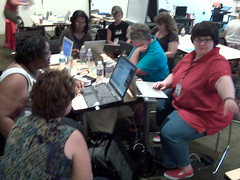
I miss these people.

The class ended in December, and I began looking forward to all the “free time” I would have.  “Free time” is in quotes, of course, because my time was not actually free before I enrolled in that course.  I simply put off some responsibilities for others.  You may have noticed I’m blogging a little more now – that’s one thing I’d been neglecting, and I apologize for that.

Unless you liked the fact I was blogging less, and in that case I’d apologize for my return to the blogosphere if I wasn’t wondering why you’re reading this in the first place.

*Ahem.* Let’s move on.

As I’m getting back into the swing of things I’m noticing that conference season is in full swing.  MICCA‘s deadline to submit presentation proposals is almost here, NECC is local-ish this year, and PETE&C is just around the corner.

Discovery rocks!

That brings my rambling to a topic worth discussing.  Every year the Discovery Education Network runs a day long pre-conference for PETE&C.  I’ve attended more than once, and every time I felt it was worth it.  Forget the fact that it’s held in Hershey, PA, a town that smells like chocolate for very obvious reasons, it’s also free for DEN Star members.  I’ve held that status for a while now, as do many of my friends who I will only get to see in person at events like this.

And I’m thinking of not going.

It’s not because of my wife’s health.  Though she’s not at her best right now, I honestly think she’d enjoy and benefit from a weekend out of the house.  (Though I shudder to think how much money she’d spend in Hershey, that’s only me fulfilling my stereotypical duty as a husband.)

It’s not because of the cost.  Gas prices are relatively down, and I have family that’s somewhat close to Hershey where we could spend a night or two if needed.  I’m not attending the full PETE&C conference anyway, so that price isn’t even a factor.

It’s because I’m not sure how much I’d learn.

OK, that sounded like a jab against the DEN, so let’ take a moment to explain it a little better.

These people rock!

On the grand scale of technological geekery (yes, I made that word up), where a 1 means I have trouble checking my email and a 10 means I can whistle into a phone line and get a 56k connection, I’m about a 4.  To people who rank 1 or 2 I appear to be a 10, but I know better.  Right now I’m at the stage where the more I learn, the more I find out how much I don’t know.  It’s exciting and depressing at the same time, because I really would like to know everything.

… but maybe not reach 10 on that scale – I can’t whistle very well.

Back on topic.  The DEN is awesome because they take teachers, many of which are 1 and 2 on the aforementioned scale, and turn them into 3s and 4s.

But I’m already a 4, which means I’m not learning as much.  Google Earth is great, but I don’t need to see another workshop that explains why it’s great.

The DEN blogs?  An awesome, free service that’s worth checking out.  When new features are added I like to know about them, but that’s because I want to know if I should install them on my own blog.

Discovery Education Streaming?  The Builders?  Microblogging?  Digital storytelling?  I could go on, but I don’t need to.  There’s more I could learn on each of these topics, but I strongly doubt I would learn much because I’m not the DEN’s target audience at this pre-conference.

If I did go, it would be to socialize.  To see people face to face that I haven’t seen in months if not longer (and in some cases never, much to my regret…), and to share with each other what we’ve learned and experienced over that time.  I’d like to do that.  To me it’s one of the most enjoyable parts of a conference – any conference.

But if I do that, I’ll probably be filling up a spot that some one else could have used.  Someone who may very well need the DEN to teach them the things that I already know enough about to run my own workshops.

I don’t think that would be fair to them.

So I really hope those of you that will be at PETE&C this year will be liveblogging it, if for no other reason than to let me live vicariously through your posts.  You don’t have any excuse not to, since you already have a blog provided to you by the DEN.

I’ll be watching.

I <3 Skitch

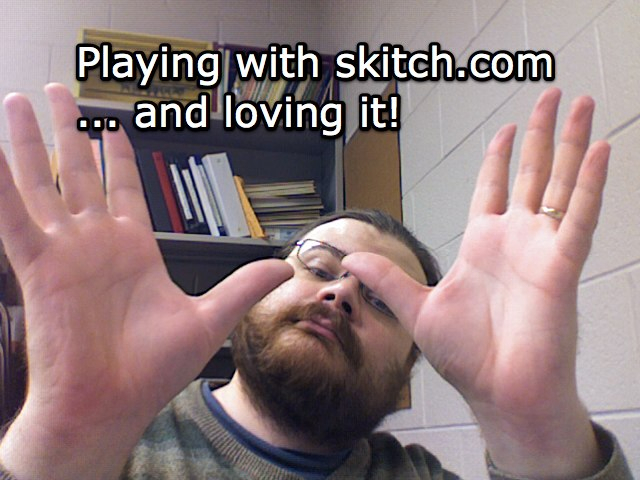
cam2Every now and then a program comes along that is so fantastic, so perfect for what I do in the classroom, that I can’t help but use it.  Skitch is one of those programs.

Honzo The Sad Monkey

I first found out about it when Bre Pettis started posting drawings he’d made using the program.  Intrigued, I downloaded it, played with it, fell in love, and used it in one of my classes the same day.  Not only was it that easy to use, it was appropriate, too.

Skitch has a variety of options out of the box.  I can start with a blank image, take a screen capture of any size or portion of my screen, drag in a preexisting image, import something from my iPhoto library, or even use my laptop’s built-in iSight camera to snap a picture of myself.  That image, whatever it’s source, becomes the background layer.

washington
(The quick math on the side shows the years between the event and the painting.)

On top of that layer I can draw, write, annotate, highlight, whatever, using a small selection of tools.  Since all of this is on a layer on top of the image I can erase or cover up without fear of destroying the original image.

When I’m done I can upload the image to Skitch’s own servers where it’ll give me a Flickr-esque code I can use to insert it into webpages.  Got a .Mac MobileMe account?  It can upload them to there instead if you want.  You can even drag the picture to your desktop if you decide you want to upload it through a different service, or simply not upload it at all.

As much as I’m loving Skitch, it’s not all things to all people.  As of now I can’t have it record video through my webcam – still photos only.  For quick video on the Mac Photo Booth and iMovie are still the way to go.

Have an older Mac or (oh no!) a computer running Windows?  You’re out of luck – Skitch will only run on Mac OS 10.4.6 or later.

The drawing tools are also very limited.  Adequate for underlining, circling, and so on, but GIMP and SUMO Paint are much more advanced with a wide variety of features.

Text can be added quickly and easily, but there’s a limit to how large or small I can make it and I still haven’t figured out if I have any control over the font.

With all these negatives, why do I bother to use Skitch?  Because it’s the best at what it does – selecting an image and building upon it quickly with minimal effort.  All the times I used GIMP in the classroom no teacher ever asked me where I got such a full featured application.  Sure, I COULD do the same stuff with GIMP or Photoshop, but that would be like using a car to visit your next door neighbor.  In most cases walking (& using Skitch) is simpler and faster.

Most teachers ask me about Skitch when they see me use it, because the interface is non-threatening and they see immediately how it can be used to reinforce their teaching styles.

It’s a shame they all have Windows based laptops.

Mistakes were made.

Welcome to 2009, a brand new year with new possibilities, new opportunities, new experiences, and the same old mistakes.

And more often than not, all of those things happen at the same time.

I have a habit of mine.  A bad habit, if you will.  A deep, dark secret that will no doubt haunt me as I’m now casting it out amongst the sea of the interwebs.

Sometimes I expect too much from my students.

I’ll take a moment for all of you to let that sink in and then collectively gasp at that realization.  It’s truly shocking, isn’t it?

Now this is not an every day occurance, mind you.  While I’ll often have high expectations for my students, they tend to rise up and meet those goals.  It’s amazing what kids can do if you just give them the opportunity.  However, every practice has a chance of failure.

Case in point: Yesterday I took a 6th grade class to the computer lab to make ads for a fictional recording studio.  The whole lesson was meant to build upon their persuasive writing lessons in language arts.  I’ve done similar lessons in the past, but always in the classroom.  Always with the more “traditional” art supplies.  Markers, crayons, colored pencils, those media are familiar territory to students.

Computers are … less so.  Granted, students can learn new technology quite fast when given the opportunity, but there is a limit to that speed, and yesterday I pushed it.  While I’m certain every student in that room was capable of doing everything I wanted, most could not do it in the time I was able to provide.  There were just too many new concepts to fit into too short a time.

Good work was done (and is still being done, from what the 6th grade teacher has told me), but we didn’t even get to upload our pictures to the wiki as I had originally planned.

So … what do you do when you find yourself in a situation like this?  Short term, cut like crazy.  decide what elements need to be covered right then and leave the rest out.  If it’s something you can continue later, save it for later.  If you know you just won’t have the time to revisit it, make the best of what can be done in the time you have.

Long term, reevaluate.  Not just the lesson, but the media used and the genre of that lesson as well.  With that class, I shouldn’t have used SUMO Paint.  Don’t get me wrong, SUMO Paint is awesome – but it was too much “new” in not enough time.  They’d just finished a PowerPoint project.  Having them build the ad on a single slide would have meant spending a lot less time on how it’s done so I could focus more on why we were doing it.

I’ll admit, in this case my bias against the ubiquitous nature of PowerPoint got the better of me when planning the lesson.  I wanted to show them something new and novel, and as a result I cost them valuable project time.

Was the lesson a loss?  No.  Even though we didn’t do every step I wanted to cover, they managed to explore an unfamiliar media (one of the objectives of my state’s art curriculum) and learn more about how advertisements grab your attention in order to persuade you (tying in with the state’s language arts curriculum).

Mistakes were made, but we learned from them.

And next time, it will be better.

Support the EFF!

EFFdonate

The Electronic Frontier Foundation is doing a fundraiser, and to kick it off they’ve released a short animated song to show just what they do.

If you’re a long term follower of this blog then I don’t need to tell you the EFF is awesome. While as an artist I feel I should have the final say with what’s done with my media, I think current practices go too far towards enforcing outdated business models.

Image uploaded with plasq‘s Skitch!