Games, Blocks, & Filters #Blaugust2026

(This is my sixth post in a series of entries I’m using to participate in Blaugust for 2026.)

There’s an interesting read on The Hechinger Report where Jackie Mader has written an article about game sites that avoid school web filters.

(The Hechinger Report, interestingly enough, releases articles under a Creative Commons license. That’s super cool of them, and one of the reasons they’re in my RSS feed reader.)

As is my trend for Blaugust, this isn’t a summary of that article, I’m using it as a jumping off point.

I have a love-hate relationship with games in my classroom.

Also internet filters.

Also, the internet.

Also, computers in general.

All for the same reason, in fact – these things that can be powerful tools for learning are also a student’s go-to for distraction. As someone with unmedicated ADHD, I know the struggle is real.

The difference is in the directions, as with most tools.

I don’t just toss my students at Luanti, I set up a modded server and direct students to complete a task, often one that requires teamwork.

I have students produce game review videos where OF COURSE they have to get some b-roll of them playing the game, but they also have to write up glows and grows (positive and constructive criticism, if we’re being fancy), script things out, record their audio, and overlay everything in post-production.

Many of the reviewed games are hosted on websites that do their best to avoid school filter blocks, which I allow so long as the content is not inappropriate for school. Students will ask what is and isn’t fair game, and I usually say “Imagine I’m showing your review to [Principal], because there’s a good chance I’m going to show it to [Principal] and your parents if you choose poorly.”

That’s usually enough guidance for a 6th grader to make the right call without going over the Student Code of Conduct in detail.

Heck, I’ve had students designing games for close to 20 years. The tools we use have changed, but the core concepts remain.

There’s plenty of reasons to block websites in school, and I’m glad it’s not my job to decide where the line is drawn, but I’ve found in my own little corner of education the easiest path forward is to take the distraction and turn it into a curriculum-based lesson.

I did the same thing with phones, back before my school banned them, but that’s another topic full of mixed feelings for a different post.

5 Things We’re Doing Wrong in Edtech #Blaugust2026

(This is my fourth post in a series of entries I’m using to participate in Blaugust for 2026.)

I recently read an article with a similar name to this one that I’ll not link here, because it made me angry enough to draft a rebuttal.

This is not that rebuttal. This isn’t even a tribute.

Instead, this is my own list, different from the other one, and limited to five things simply to keep this post shorter than a novel. I could go on. I could nitpick. I would rather not invite that poison into my soul this morning.

(And yes, these are in a numbered order, but what that order should be has changed on a daily, sometimes hourly basis for me. I might adjust it after I’ve written all five. I might not.)

#5 We call it EdTech

TL;DR: I don’t like that it’s shoved over to be a separate thing when technology use should be in everyone’s domain.

There’s plenty of reasons to use labels, but doing so fits things into neat little boxes when the world is not so easy to organize.

I’ve been my school’s “EdTech” teacher for as long as it’s existed, and with that comes a concept held by too many people that I hold a fiefdom over all that has blinking lights and LCD screens.

We’ve moved away from that a bit in the past 6 years (I wonder why…) but the problem persists, with teachers using class Chromebooks for unsupervised “independent study” time because they’re not “techy” enough to do more.

In truth, any technology is a tool that makes life easier for those who are using it. (If it’s making life harder, someone’s doing something wrong.) The first of our ancestors that learned a pointy stick kept their food from running away was using technology. It should not be mystified just because now a lot of it has rocks we tricked into doing math.

There are plenty of people who make loving tech their whole personality and try to build walls up so anyone not on their level doesn’t get to be “in the know” and learn how to use the tools. Those who just want things to work don’t need to help build those walls.

#4 We Let Capitalism Lead It

TL;DR: Nothing in education should be a for-profit enterprise, because that shifts priorities to making money, not supporting students.

Schools, traditionally, are underfunded. Underfunded schools do not traditionally have a lot of money to spend on technology. Therefore, schools will frequently look for the free and/or cheap options.

This means the schools will have tons of open-source software running on refurbished hardware, right? Hahaha, my lab is an outlier and does not get counted.

No, a lot of the tools we use are “freemium” to get us hooked before charging for more features, or ad supported, or have data collection, or are provided at steep discounts so that students (and teachers) get locked into the “but I’ve always used [thing]” mentality.

Look at what Apple did in the 1990s. All of those Mac labs existed for a reason, and it helped keep them afloat for years.

Google’s doing the same thing with Chromebooks, and they don’t even need to deal with hardware or marketing to make it happen.

Sure, to be in my school system they have to promise to not collect any data on our students, but this is Google. If they have someone locked into their ecosystem by 3rd grade then as soon as that kid creates a non-student account the data collection and selling begins.

Adobe makes me the angriest, though, as even my own colleagues in the past have said their students needed Adobe Creative Suite to be successful. Why? It’s the industry standard. Why? Because everyone uses it. Why? Because it’s the industry standard.

There’s no such thing as a free lunch, I know. Using open source software in my lab requires me to do more work installing and maintaining things, but my students will still know WHEN to make the cut from one scene to another.

#3 We Lowered Our Standards

TL;DR: Some tools we use are garbage, but we still use them because they’re “educational.”

A long time ago I was really into a handful of Christian Rock bands. Alas, only a handful, because the rest were … developing their skills. Christian Rock was a small enough niche that a band could get their foot in the door and be on the local Christian Rock radio station with a level of quality one could not find on any pop, country, or oldies station because the bar for those was too high.

Most “educational” programs I’ve played with have either been heavy on the fun with a glaze of flash cards on top or heavy on the flash cards with showing a point total to make it “gamified.”

I’ve had far more success taking tools never meant to be limited to the classroom and having students make things with them. Kdenlive isn’t a video editor for kids, it’s a video editor. The lesson is in learning how to use it, and it doesn’t need a cartoon mascot for that.

(Although Tux Paint has a cartoon mascot and is super fun, so there’s always exceptions.)

#2 We Abandoned Old Successes

TL;DR: Things that work well don’t have to be dumped just because we found a new thing.

Remember when blogging and podcasting were big in education? No, not recently, I mean the first time, back in the ’00s, before some of my coworkers were born.

How about game based learning? Gamification? (You know those aren’t the same thing?)

Each of these was a trend that was popular for good reasons that just faded away to obscurity, not because it got worse but because the next new trend showed up and there was only so much time in a school day.

#1 We Jump on Bandwagons Because They’re Bandwagons

TL;DR: If not adopting AI will have me get left behind, then I will leave you to join the lemmings and be here when the bubble has burst with my cognitive skills intact.

I’ve seen a lot of fads come and go: ’80s hairstyles, Bitcoin, NFTs, and candy colored computers are just some of them. You can still find fragments left behind, but they are all shadows of their former selves.

AI is one of these trends, with companies relabeling rather tame algorithms as “AI” because that’s the buzzword of the day.

It disgusts me that so many EdTech “leaders,” some of whom I respected in the ’00s, have seen this as the next big thing and hitched their wagons to it.

Gotta make a buck somehow, if your income is public speaking and book sales, I guess.

Whenever I converse with an AI advocate, I get the same talking points:

  • “You’re not teaching your kids what they need to know.”
    • My students know how to make movies. Yours know how to write a prompt and have a program steal other movies and mash them together to make something that looks the same as every other AI generated piece of slop. Our classes are not the same.
  • “It gives you more time for the important work.”
    • Everything AI generates is subject to errors, and people are getting in trouble when those errors slip through. It takes me less time to make a thing than it does to double-check the output from a plagiarism engine.
  • “It helps students learn.”
    • Citation needed. (I’m never provided any when I ask.)
    • Any time the work is done for my students, they don’t learn. My kindergarten students don’t learn their passwords in classes where the teacher types it for them, but in my class most of them have it down in two weeks. They learn by doing. If AI does the work from them, what are they learning?
    • I teach HTML coding. AI can write code, but AI written code is very hard to maintain. I can look at my hand-coded websites and edit them. My students can do the same. Yours can, what, ask the AI to do better this time?
  • “It’s cheaper than paying an artist.”
    • Theft usually is. Knowing how to steal is not the flex you think it is. Telling an art teacher that kids should know how to steal from artists is certainly a choice.

One last thing about the AI bandwagon that is spreading like a cancer: The people making money in a gold rush are the ones who sell the shovels.

The established shovel makers aren’t building more factories. They see the bubble for what it is, and don’t expect it to last long enough for a new factory to pay for itself before the bubble bursts.

When that happens, I’ll be here – still teaching how to make cool things without typing prompts into a souped up spellchecker, while others have forgotten how to do anything without asking an AI for advice first.

PUWT18 Presentations

As is apparently tradition for me, I’m presenting two sessions at this year’s Powering Up With Technology Conference. (My first presentation at PUWT was … 2006? 12 years ago? Wow!)

Rather than give long and difficult to type URLS for my presentations, I thought I’d share them here. (Yes, I am aware that “academicaesthetic” is not universally easy to type, but it’s easier than, say, “o03Eil5s,” and people can get here from AaronBSmith.com … hm, maybe that’s the link I’ll share.)

Keep in mind that these Google Slides are primarily my visual aids, as opposed to the talks themselves, and I’ll probably be changing slides around up to and including 5 minutes before my session starts. If all goes well I’ll have recordings of the actual presentations that I can post on this website as a follow-up.


Scholar.Social: A Mastodon Network For Teachers

I wrote a short time ago about how I really liked Mastodon and thought teachers should give it a try. At the time I’d settled on a home server but lamented that there was no instance (each Mastodon server is called an instance) set up specifically for teachers.

Well never fear, because scholar.social has stepped in to fill the void!

As the name implies, scholar.social is not JUST for teachers, but anyone involved in academics. The tag line they use is  “The Mastodon profile that you’re not embarrassed to put on the last slide of a presentation at a conference,” which is a little wordy I’ll admit, but I think it’s  a great ideal to live by.

It’s a small instance at the time I’m writing this, but as someone who has debated making an instance just for myself I don’t see this as a bad thing. Something I enjoy on Mastodon is when I can look at the Local Timeline and not have it scroll past me faster than I can read. I was getting that on mastodon.cloud and mastodon.social, but not on elekk.xyz. I’ll admit, being able to see what others were saying on my instance kind of spoiled me, so I’m glad my new home lets me enjoy that again.

scholar.social logoI’m not going to say this will replace Twitter. Twitter didn’t replace Tumblr for me, and Tumblr didn’t replace this blog. I will say that so far I’m enjoying Mastodon, scholar.social specifically, and think that if you like reading what I put on this site you might enjoy it yourself.

So if you’re a teacher, why not give it a try? When you do, say hello. All the cool kids are doing it.

And so am I.

Adam Savage’s “Sunday Sermon” at Maker Faire 2017

I’m growing more and more certain that everything Adam Savage touches turns to gold, even the things that fail spectacularly.

For years, now, Mr. Savage has been giving a  short talk at the annual Maker Faire. They are full of inspiration, encouragement, and awesomeness. This year’s talk is no different.

The giant ant he rides in on is a bit of a bonus.

Why This Site Is Self-Hosted

Sites like Facebook, Twitter, Tumblr, Flickr (the list goes on…) are (or have been) extremely popular, in part because they’re free, but also because they’ve reached a “critical mass” of users. I know many people who only use Facebook because their friends and family use Facebook, for example.

Separate from this is a trend known as POSSE, or Publish (on your) Own Site, Syndicate Elsewhere.

Like it implies, following a POSSE strategy doesn’t forego having and using the free social media sites that are so hip with the kids these days, particularly the ones who don’t describe neato things with the word “hip” (or “neato,” for that matter…). Instead, you put your meaningful content on a site you host yourself, then link to it on those networks.

I like this plan. Here’s why.

Here today, gone tomorrow.

A sizable portion of the things I have made were uploaded to services that no longer exist. Remember Geocities? Mac.com web hosting? Tumblr is still around, but I apparently went so long without using it that an older account of mine was deactivated and resurrected by someone spamming ads for real estate.

We assume when we create an account on a free service that it will stay online forever, or at least until we’ve lost interest. Those of us with more gray hairs know that this is simply not the case. A lot of people today are mourning the loss of Vine, but it’s far from the first to go and certainly won’t be the last.

(Side note: My wife did all her blogging on a Tumblr account. I’m going to have to find a way to preserve that somehow.)

You’re the product.

I’ve heard “If you’re getting a service for free, you’re not the customer, you’re the product” so often that it almost loses meaning now. Unfortunately, it is frequently true.

Google doesn’t make money hand over fist because they’re selling physical items or search results, they’re making money because so many people see the stuff they do that buying ads from them is cost effective. (I say this knowing full well that some pages on this website include ads  from Google. I didn’t say all advertising is bad.) The same is true for Facebook. Twitter is … working on it, but they have a problem still with bots and harassers so their store of products seems a bit tainted to prospective buyers.

I pay a company for server space. Because that’s their product and keeping me happy is the best way to keep me sending them money, they work hard to do so. On a free service that is mostly depending on ad revenue and/or data collection, the people they want to make happy are the ones sending them money.

This happened recently on YouTube, where advertisers got particularly annoyed when their ads started showing up in front of incredibly offensive content. As a result, YouTube has seriously cut back on which videos can be monetized. So far, so good, right? Yes, except the algorithm isn’t as fine-tuned as it could be, and now non-bigoted people (I’m assuming, but I like to assume the best when possible) who depend on YouTube ad revenue to pay their rent are a bit concerned about their drop in income.

I like YouTube. It’s where I post all of my tutorials as well as my more recent conference presentations and vlogs, but I wouldn’t depend on it for my income even if my channel subscriptions went through the roof because I’d be relying wholly on a company NOT designed or motivated to keep me happy meeting my needs. (I’d also be squeamish about forcing my students to watch tutorials that make me money. The channel I use to host my tutorials is currently not set up for monetization. If you see ads, the revenue isn’t going to me.)

Self-hosted content is (more) mobile.

I said before that I like my web host. I do, but if I somehow change my mind it would take only a little bit of work to back up this entire site with YEARS of content and move it to another host. There are a few other companies that do that, but it isn’t universal and it isn’t always easy.
Google is one of the few, which is part of the reason I was able to move from Blogger to WordPress without copy/pasting blog posts by hand.

Flickr theoretically has an option for downloading all your photos, but the last several times I tried it didn’t work. If I had been uploading all my photos to a self-hosted site instead of Flickr, I wouldn’t be so concerned about this.

Twitter allows you to request an archive of all of your tweets.

I haven’t seen anything on Facebook or their subsidiaries (Instagram, etc.) allowing you to download all of your content from them.

Vine offered this, but they’re gone now.

You don’t need to leave, but a permanent home would be good.

This entire post was inspired by Doug Belshaw’s post about why he’s “leaving” Twitter. I use quotes because he’s not abandoning Twitter like I abandoned my old nameless-to-not-support-a-spammer Tumblr account. Instead, he’s switching strategies.

To Mr. Belshaw, the Twitter of yesteryear was a place where he had conversations. Now, it will be a place where he uses a bullhorn to tell followers about the cool stuff he’s doing elsewhere. It’s a viable use for the medium, and many people use Twitter for mostly that anyway.

“But blogs are for long form content, not rapid-fire ephemeral but public communication,” you might counter. “Surely he’ll continue to use Twitter for that.”

Eh, Twitter’s not the only option for that, either.

(I’m on Mastodon as well, if you want to follow me. UPDATE: I found an academics themed instance and I’m giving that one a try.)

(Also, if you want to try self-hosting and help support this blog at the same time, try Dreamhost. If you don’t like clicking affiliate links, here’s one to Dreamhost that doesn’t support me at all.)

PICO-8 Progress

It’s been a few days since I  started messing with creating content in PICO-8, so I thought I’d document my journey so far through the magic of bullet points.

  • There’s a programming cheat sheet.  This helps.
  • There’s also a more detailed manual online,  if you want to know everything.  (This might not be the best starting point, though.)
  • YouTube Video tutorials abound, though the language in some is not safe for school. I will likely make my own tutorials once I feel I have enough skill to do so.
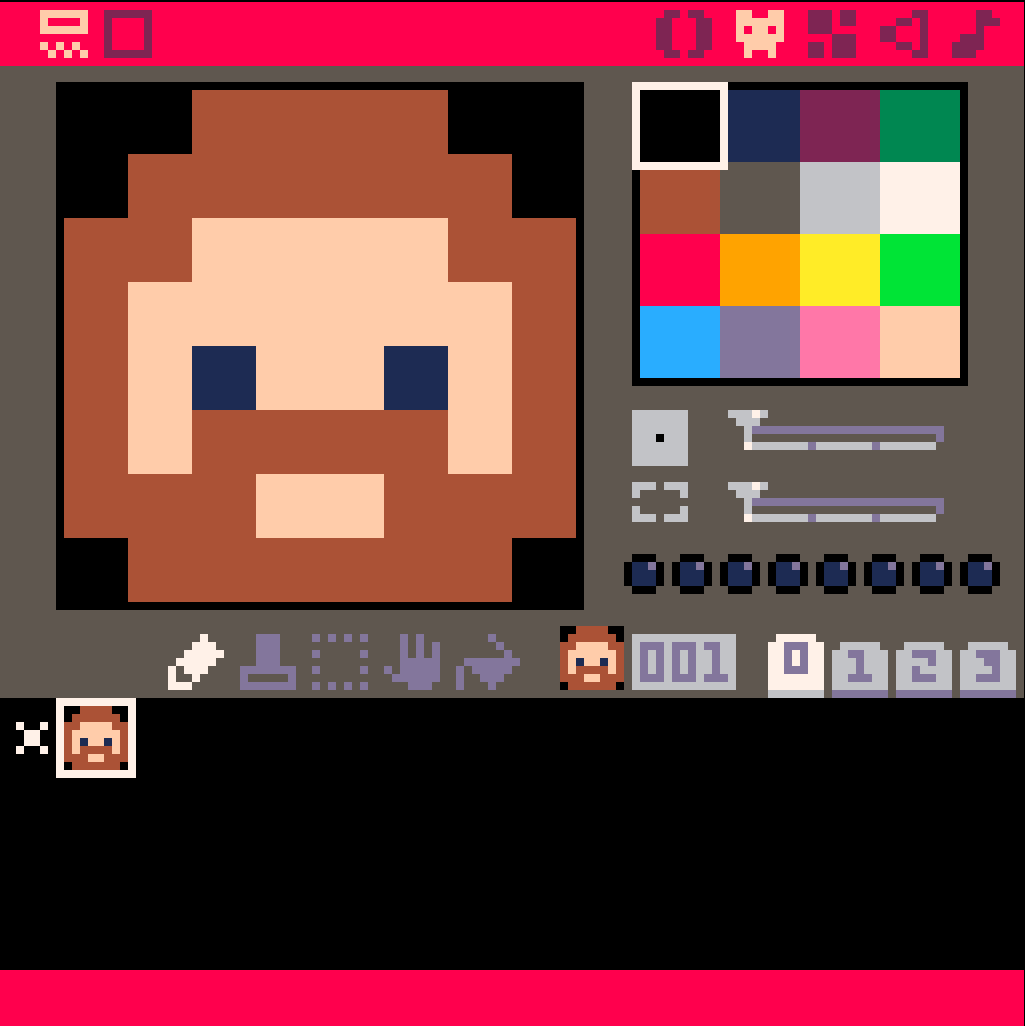
  • Pressing F9 to save 8 seconds of an animated GIF to your desktop is a really neat feature that I will probably be using more than I should. (The images aren’t large by default. The GIF in the corner here is shown full size.
  • This is definitely something my students are not going to understand fully on the first day.
  • This is something several of my students are going to love.
  • I got caught up in the sprite editor at first. I shouldn’t have. You can do all kinds of cool things without sprites at all. Start there.  The sprites are nothing without the code. The code can do plenty without the sprites.
  • I have 10% of an idea of what I’m doing, and I love it. This is my kind of learning – I am outside my comfort zone, but not by such a large margin that I’m afraid to see what changing a parameter does.
  • The “Undo” shortcut of Ctrl-Z works, and it is a lifesaver. Also:  Copy & Paste work as intended.
  • Programming is an algebra teacher’s answer to the age-old question of “When are we going to need to know this?” Only in this case, you’re telling PICO-8 to plot X and Y and oh, wait, now change those numbers to this and keep changing them and use  those numbers as the modifiers for changing themselves and no, you’re not plotting a line graph, I want a new image each time.
  • This is fun.

More updates as I do more.

It Shouldn’t Be Hard(er)

Taking a short break from long blog posts to give you this little tidbit I’m fond of saying.

Note that this doesn’t specify who’s doing it wrong. Sure, it MIGHT be you, but it might be a student, administrator, or even the person who designed that bit of technology in the first place.

Come to think of it, that last scenario has occurred more times than I’m willing to talk about.

In any case, it has a kitty in the background.

Getting Homework to Work, Part 2

Yesterday  I started documenting my efforts towards making homework enjoyable enough for my students to actually do it for a change. By the end of that post I’d set up a weekly assignment where students made a video series as if they were YouTube stars. There was a definite increase in participation and quality, but I wasn’t quite done.

Binge Watching Isn’t So Bad.

I started by taking all of the homework videos submitted over the previous week and throwing them in a folder in Google Drive. My district uses G Suite (formerly GAFE, or Google Apps For Education),  so I’m one of those lucky ducks with unlimited storage space.
In the past I’d tried tossing them all into a playlist and showing them in class on my LCD projector, but with a 1:1 ratio in my lab there was nothing stopping me from letting students watch and critique these videos at their own pace.

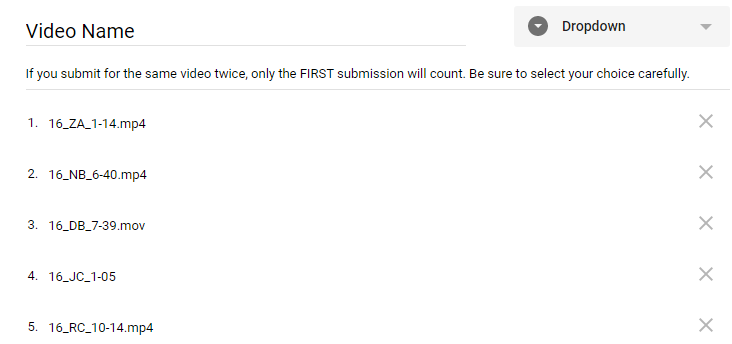
For convenience I also renamed all the videos following a specific naming convention. If John Doe submitted a 2 minute 11 second video for the 3rd video in his series, I named it 3_JD_2-11.mp4. This was a marked improvement over the previous names, which ranged from “My Edited Video” to “12345.mov” … I wasn’t grading students on how they named their files, so long as they uploaded the right ones.

With all the videos in a folder that I could share through Google Classroom, I was almost ready to go.

Will This Be Graded?

It doesn’t matter how enjoyable an activity you design, there will invariably be someone who asks if it’s going to show up in your grade book. I personally have an aversion to assigning “busy work”  because  I end up making myself busier as I grade something that was meant to be filler, but  there’s still that student, as dependable as death and taxes, that will ask if THIS time I’m giving them work that doesn’t matter.

Nope, it’s not enough to do things out of the goodness of your heart, you need numbers to go with it. Numbers I am happy to provide, in fact, so long as you give me a few in exchange.

I took all of the renamed videos and put them in a Google Form. I made it a “Dropdown” question, since otherwise my students would be scrolling for days.

(Pro Tip: If you don’t want to type everything in, you can’t select text in Google Drive’s web interface but you CAN  tell your browser to print the page. When the preview shows up, DON’T press the print button – the text in the preview page  can be selected, copied, and pasted into a Google Form. You’ll get some extra lines you’ll need to delete, but that’s easier than typing everything by hand.)

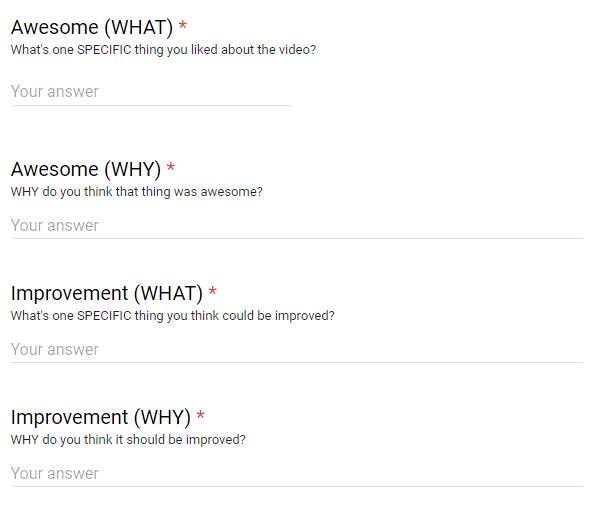
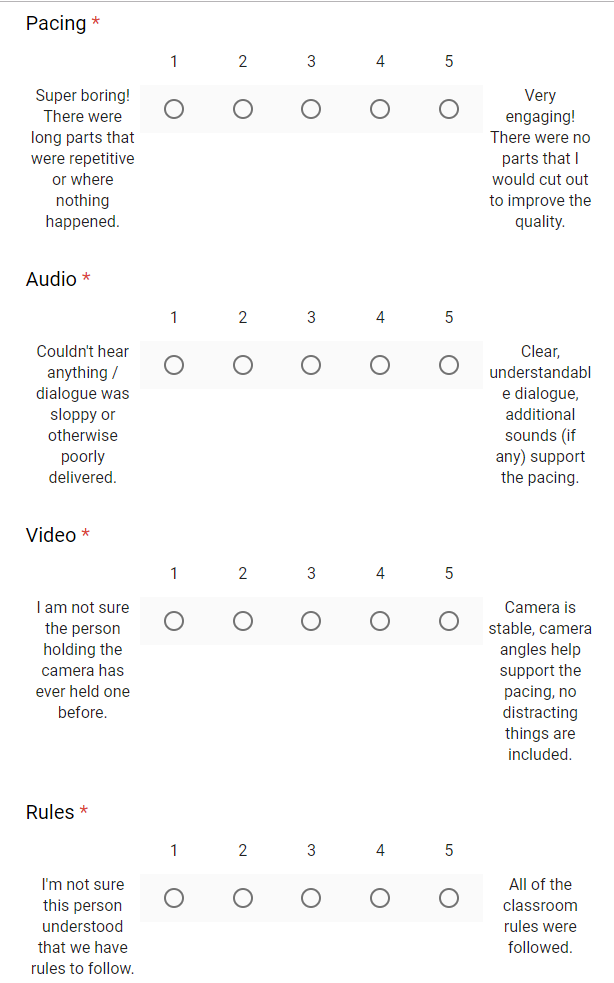
Then I added four “Linear Scale” questions that my students would use to rate the videos they watched. We’d already talked in class about these categories, so they were familiar with   them and didn’t need much in the way of explanation.

I capped it off with “Short Answer”  questions that allowed students to offer some criticism.

After the critique is over I  find the average for each category and then add the four categories up to get a score out of a possible twenty points. Critics get a score as well, earning one point for every three minutes of video graded.

Testing Boundaries

Of course this  has not always gone smoothly. There have been students that thought single word critiques, or pasting in the same sentence for each critique, were acceptable. One day when I was absent half the class invented time travel and managed to critique all the videos in  a tenth of the time it took to watch them.

I caught those students, because timestamps are a thing and I refused to treat this like something meant to save ME time and energy.

I’ll say that again: Letting students grade and critique student videos IS NOT faster than grading them myself.  I still have to watch the student videos  (why wouldn’t I?) and if anything I spend more time grading critiques than I did grading videos. I’m sure as I keep doing this I’ll find ways to streamline the process, but that doesn’t mean I’ll have more time for video games afterwards.

Keeping What Works

The goal was to get more students to start submitting their homework videos, and it’s working. My kids, with some exceptions, like writing comments when they know their classmates will read them. They like making movies when they know their classmates will write comments.

But what about the grades, you might ask? Won’t the students just give each other 5/5 on everything? There are a few that give incredibly high scores regardless, but with anonymous grading (on the student end – I see everything) and a class my size, it mostly averages out. Even if they did collude to give each other high marks, my homework grades are mandated by my district to count significantly less than my assessment or classwork grades.

Overall the scores are SLIGHTLY higher than what I’d give using the same rubric, but well made   videos still score higher than lower quality ones.

And they’re   getting better.

As a member of their audience, my students can take me or leave me. I’m far too old and out of touch with today’s youth for my opinion to mean much. But their peers? Those are opinions that mean something, and I’ve given my students enough training for them to point out what areas of technique need improvement.

So there you go. Your mileage may vary, but this setup seems to be working for me. All it costs is one class per week for critique and a significant portion of my planning time to organize and grade the  commentary, but the end result is students getting better at something they actually like to do.

That works for me.