DOPA Alert!

Swiped from Will Richardson, who in turn swiped it from David Warlick:


ALAWON: American Library Association Washington Office Newsline

Volume 15, Number 73

July 25, 2006

In This Issue: URGENT ACTION ALERT: Call Representatives TODAY and ask them to oppose DOPA

URGENT Action Needed:

The Washington Office has learned that the House may try to expedite
passage of H.R. 5319, the Deleting Online Predators Act (DOPA),
TOMORROW, July 26th.

PLEASE CALL YOUR REPRESENTATIVES TODAY and ask that they oppose HR 5319. Capitol Switchboard number is: 202-224-3121.

Background:

DOPA is sponsored by Rep. Fitzpatrick (R-PA) and supported by the
House Republican Suburban Caucus. It would require that, as a condition
of receiving E-Rate support, all schools and libraries block access to
social networking websites and chat rooms.

The bill raises a number of issues:

1) Local school districts and libraries should determine what
content should flow into schools and libraries. Federal mandate over
content control is very problematic.

2) Districts and libraries already have the power to block access to
social networking sites and chat rooms and a number of them have
already done so.

3) DOPA imposes yet another burden on schools and libraries
participating in the E-rate and may deter many from continuing to
participate.

4) This bill paints an unflattering and distorted view of the Internet
as a whole, serving to scare away parents, students, teachers and
librarians from making use of all its resources.

Last week, YALSA Executive Director Beth Yoke testified on DOPA
before the House Subcommittee on Telecommunications and the Internet on
DOPA. You can read her testimony here:http://www.ala.org/ala/washoff/WOissues/techinttele/DOPA_testimony.pdf.

Academic Aesthetic Podcast 86

Click to listenSteve, this is all your fault.

Back when I was interviewing Steve Dembo he mentioned that they had finally come out with a microphone for the video iPod. I thought I could just file that information away, but no.
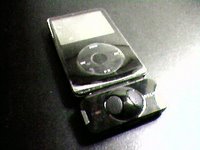
Instead, knowledge of the Belkin TuneTalk Stereo nagged at me for over a week. On Friday when I went to the Apple Store to buy a new laptop battery I was greeted by multiple rows of the shiny black marvels, and as I’m easily distracted by shiny things I really had no choice but to get the battery AND the microphone.

Rather than keep this just another story about an expensive impulse purchase, I’ve decided to turn it into a review of the very same device. You may have noticed a difference in the sound quality for this podcast. That’s because while I recorded the introduction with my tried and true USB mic, the rest of this is being done with the TuneTalk. You know how it is when you get a new toy – you use any excuse to try it out!

The first thing I noticed when I opened the box was that there was a USB cord in there. The TuneTalk has a standard sized USB port on the bottom of it, so I can sync and charge my iPod without removing the TuneTalk. That’ll come in handy if I ever loose one or both of my iPod cables, but more importantly it lets me charge the iPod while I’m recording. If you’ve ever watched video on an iPod you know how fast that battery can drain when it’s spinning the hard drive at full speed, and recording audio appears to be no different in terms of energy consumption.

It’s possible to open the case without lacerating myself, and with my precious TuneTalk in my hand I noticed that it felt … well … cheap.

An iPod itself is a marvel of molded plastic and metal, and despite it’s size it has a weight to it that lets you know Apple didn’t skimp on the components. The $70 TuneTalk (UPDATE: It’s a lot less now) is as light as a feather, making me wonder just how thick that plastic really is. Still, I guess if you keep in mind that it has to hold onto the iPod by the very connection that sends all of the data and power you don’t want it to be too heavy.
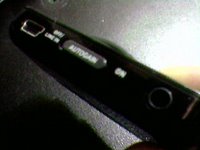
I did a couple test recordings immediately, with and without the gain switch turned on. (The gain switch, by the way, can be adjusted depending on if you’re in a noisy or quiet environment so that it can pick up your voice better.) It’s possible to go through the menu features of the iPod to turn recording on and off, but this seems like a waste of time since there’s a convenient button on the left side of the TuneTalk that takes you to the record screen right away. I love that feature.

I also noticed that it had a line in jack for recording audio from an external microphone or other device, although the manual said that using the line in jack turns the internal mic off. Visions of splicing my laptop’s audio output with an external mic to do real time mixing came to mind, but as I’d have to buy more stuff to see if that would work I’ll save that experiment for another day.

Test recordings done, I synced up using the included USB cable rather than unplugging the TuneTalk. I was surprised to see that iSync didn’t load when I plugged it in, but everything else synchronized just fine. The recordings I made showed up in a playlist labeled “Voice Memos,” but they were also grabbed by some of my Smart Playlists. I’ll have to adjust them later so the next time I’m playing Civilization I won’t have to stop conquering Europe to fast forward past a grocery list when all I wanted was some mood music.

I took a look at the test files and noticed that they were in fact quite large. I’ve recorded on portable devices before, but they always saved the audio as 4 bit WAV files – not exactly the most space demanding of formats. Belkin wasn’t kidding when they said it recorded CD quality audio. A twelve second recording at high quality was over 2 MB! Sure, I can go through my iPod’s menu and switch to low quality, but right now I’ve got 10 GB of free space on that little hard drive so I’m not too worried about it at the moment. I can always compress everything in GarageBand afterwards.

The last thing I’d like to bring up is that the TuneTalk does in fact record stereo. I’ve heard more than one podcaster get ahold of a stereo microphone and rave about it, but as I usually compress my podcasts into mono to save space I’m ambivalent about it. I suppose it could come in handy if I was trying to record multiple people, as the listeners would be able to tell the speakers apart by their locations. I want to do more interviews this school year, so this might actually come in handy.

Ok, let’s wrap this up here. Believe it or not I’m actually happy with the TuneTalk, mostly because in spite of it’s aforementioned flaws it’s very convenient and makes a very nice quality recording. That said, it’s not for everyone.

If you want a portable recording device and you’re on a tight budget, just set up a free account through audioblogger.com or one of the other services that allows you to record through a phone conversation.

If you’ve got $40-$100 to spend but don’t have a video iPod, check out Creative’s line of MP3 players. I used to use a 1 GB Creative MuVo to record most of my podcasts, and it worked just fine. (You can also get it in other sizes.) I’ve also heard some very good things about the Creative Nano, which is more or less the same device with a different case design.

But if you DO have a video iPod and you want to turn it into a portable recording device, get your hands on a TuneTalk. The boost in recording quality alone is worth it.


Academic Aesthetic Podcast 85

Click to listenIn today’s podcast I review eyespot, a web based video editor.

Sometimes I plan a podcast topic for days before I record it, other times I throw out that hard work in favor of an idea that strikes me at the last minute. Take yesterday, for example…

A member of last year’s Art Club has been planning on starting his own podcast, and over the past couple of weeks we’ve been trading emails and IMs on the subject. Yesterday he was very interested in video editing, but unfortunately he doesn’t own a Mac so my favorite program (iMovie) won’t run on his system. I suppose he could use MovieMaker, but I’ve never been a big fan of the Windows Media format.

Fortunately there are a few editing programs out there that are totally free. One of them is jahshaka, an open source cross platform program that claims to be “Powering the New Holywood.” Oddly enough I’ve never tried it out, but if anyone out there has then please let me know how well it works.

There are also a couple web based solutions. That’s right, you can edit video with a web site. Thank you, Flash and Ajax.

Eyespot and Jumpcut are both sites that cater to the video editing community, and I’ve heard good things about both, although yesterday I only had time to play around with eyespot.

Eyespot has in my opinion only three drawbacks. The first is that they display the most recent videos on their frontpage. For most of us that doesn’t matter, but if I want to show it off to my students I’ll have to do some explaining if a certain genre of video appears for all to see. This is in fact the only issue that will keep me from using it with my students.

The other two problems are more technical in nature. While there doesn’t seem to be a limit to the number of clips you can upload, you can’t upload anything larger than 50 MB. That’s a huge file if you’re talking about .mp3s or .JPGs (both of which can also be uploaded), but I have a 10 minute .AVI I made with my camera that ended up over 140 MB. I actually had to use a free program called MoviesForMyPod to compress it into a more uploadable file format.

The last problem I encountered was a lack of features. There are few transitions to choose from, and while you can create a title screen the default text is small and uninspiring.

Still, one has to remember this is a free service. In spite of all of these issues I had fun using eyespot. It edited my video faster than I could have done on my own computer, I was able to download the finished product to my hard drive, and it was even iPod compatible.

If you want to hear an interview with one of the big wigs at eyespot you can check out this podcast by Amber MacArthur.

Mini Lesson 7: Origami Water Bomb

I love origami, so whenever I need an idea for one of my mini lesson videos I tend to lean towards that first. Lucky for me I know a lot of designs that are public domain!

I tried something new with this episode. Instead of using iMovie I tried out eyespot.com. It’s not as feature rich as iMovie, but it does a decent job and even allows you to export video for video iPods. Nice.

This is the second of two lessons that I recorded at the DEN North East Regional Institute. It has nothing to do with the DEN other than that.

Download it here.

Academic Aesthetic Podcast 84

Click to listenIn this podcast I talk about being famous for fifteen people.

In addition to silkscreened soup cans and pop culture icons, Andy Warhol gave us the quote “Everyone will be famous for fifteen minutes.”

This statement has often been rehashed as people earned their own 15 minutes of fame (American Idol rejects, anyone?), but nowadays it’s more likely that everyone will be famous for fifteen people (according to people like Steve Dembo).

Don’t believe me? Well, you’re already famous … relatively. (I’ve talked about this before, although this time I’m going in a slightly different direction.)

Look at your students. Have you ever run into them outside of school? Did the older ones call out to you, smile and wave? Did the younger ones eagerly point out to their parents that YOU were their teacher?

I thought so.

To your students you ARE famous, more so than most politicians or heads of state. Granted this can make many of us uncomfortable, but I think that’s a good thing. If we’re uncomfortable with fame, then we know our ego isn’t totally out of control.

I’ll admit I’m a bit of a ham when I get up in front of a class, but at the DEN National Leadership Conference I was still genuinely surprised every time someone said “Oh, YOU’RE the Art Guy!” I know my students think I’m famous, but I didn’t expect to be so well known by other teachers.

I wasn’t alone in that. Josh Wolff, the Discovery Educator Abroad, is a teacher from New York that had the opportunity to tour the Pacific Rim while taking photographs and creating video webisodes. He knew they were going to be used for educational purposes, but nevertheless he seemed quite shocked when I told him my Kindergarten kids loved his webisode on visiting a tropical zoo.

He was reaching a wider audience than he had expected, and seemed visibly taken aback by that.

Naturally, I then did what any self respecting educator would do at that point – I got my picture taken with Josh, so this year I could show off to my students just how famous I am.

Academic Aesthetic Podcast 83

Click to listenIn this episode I touch on the highlights of the DEN National Leadership Conference.

Work and PlayIt’s been over 72 hours since the National Leadership Conference ended, but I’ve still brought a lot of the event home with me. Most noticeable are the aches and pains from being more active than I’m used to, but also a perpetually running nose that forces me to sniffle at odd times. I guess my body’s trying to prove to my mind that it’s not young anymore, but don’t worry – my mind is still thoroughly unconvinced.

We all had so much fun last week that I doubt I could fit all the details into one of the short podcasts I enjoy doing, so let’s see if I can just touch on the highlights. I’ll go into more depth in future podcasts if the mood strikes me.

Hangin' at the reception.On Monday night we had a reception where we met old friends and made new ones.

On Tuesday we were reminded that (Dem)Bo knows podcasting, barbecue on the roof is fun, and moonlight tours of DC are awesome.

(Dem)bo knows... First Time Podcaster Rooftop Bar-B-Q Reflection pool and reflection

Crazy Mind Meets Great MindOn Wednesday we hung out with Josh Wolff (the Discovery Educator Abroad) and got to see the first episode of Discovery Atlas before anyone else, not including the producers.

InterviewOn Thursday Alan November gave us a presentation, then we ran around DC to work on our projects and then returned to learn about Discovery’s Global Education Partnership. At the end of the day we went bowling, and one of us wore the rental shoes back to the hotel.

On Friday we showed off our group projects, bid each other fond farewells, and headed home.

Look out, world!Overall the conference was awesome, and while I wasn’t sure if I myself would learn anything new, I’m pleased to say that I did.

If you want to learn more about what happened at the National Leadership Conference I’d check out Flickr.com and the many DEN staff blogs.

Oh yeah – I also did a guest blogging spot on the Maryland DEN blog, so if you have the time you might want to read that as well. Trust me, it’s not redundant.

Technorati Tags: