As I write this, a lot of final exams are being given and/or graded. Mine are actually due today, and internet use isn’t an option, it’s a requirement.

I started this website as a young, optimistic, visual arts teacher. Now, I'm an old man yelling at cloud computing.
About Education
As I write this, a lot of final exams are being given and/or graded. Mine are actually due today, and internet use isn’t an option, it’s a requirement.
Yesterday  I started documenting my efforts towards making homework enjoyable enough for my students to actually do it for a change. By the end of that post I’d set up a weekly assignment where students made a video series as if they were YouTube stars. There was a definite increase in participation and quality, but I wasn’t quite done.
 I started by taking all of the homework videos submitted over the previous week and throwing them in a folder in Google Drive. My district uses G Suite (formerly GAFE, or Google Apps For Education), Â so I’m one of those lucky ducks with unlimited storage space.
In the past I’d tried tossing them all into a playlist and showing them in class on my LCD projector, but with a 1:1 ratio in my lab there was nothing stopping me from letting students watch and critique these videos at their own pace.
For convenience I also renamed all the videos following a specific naming convention. If John Doe submitted a 2 minute 11 second video for the 3rd video in his series, I named it 3_JD_2-11.mp4. This was a marked improvement over the previous names, which ranged from “My Edited Video” to “12345.mov” … I wasn’t grading students on how they named their files, so long as they uploaded the right ones.
With all the videos in a folder that I could share through Google Classroom, I was almost ready to go.
It doesn’t matter how enjoyable an activity you design, there will invariably be someone who asks if it’s going to show up in your grade book. I personally have an aversion to assigning “busy work”  because  I end up making myself busier as I grade something that was meant to be filler, but  there’s still that student, as dependable as death and taxes, that will ask if THIS time I’m giving them work that doesn’t matter.
Nope, it’s not enough to do things out of the goodness of your heart, you need numbers to go with it. Numbers I am happy to provide, in fact, so long as you give me a few in exchange.
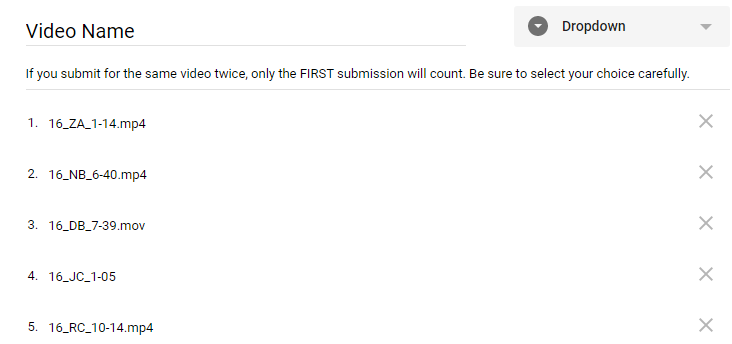
I took all of the renamed videos and put them in a Google Form. I made it a “Dropdown” question, since otherwise my students would be scrolling for days.
(Pro Tip: If you don’t want to type everything in, you can’t select text in Google Drive’s web interface but you CAN  tell your browser to print the page. When the preview shows up, DON’T press the print button – the text in the preview page  can be selected, copied, and pasted into a Google Form. You’ll get some extra lines you’ll need to delete, but that’s easier than typing everything by hand.)
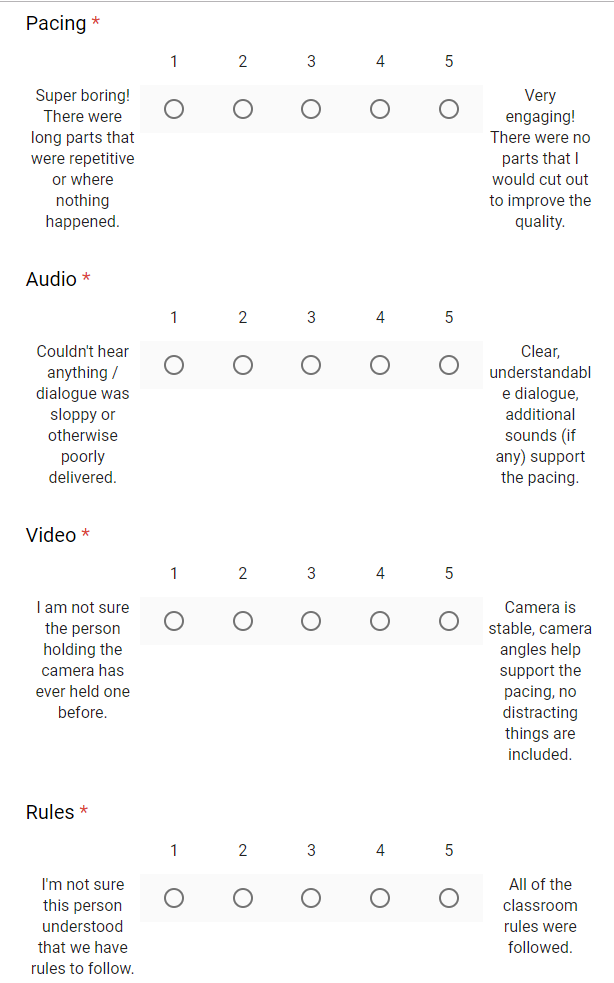
Then I added four “Linear Scale” questions that my students would use to rate the videos they watched. We’d already talked in class about these categories, so they were familiar with   them and didn’t need much in the way of explanation.
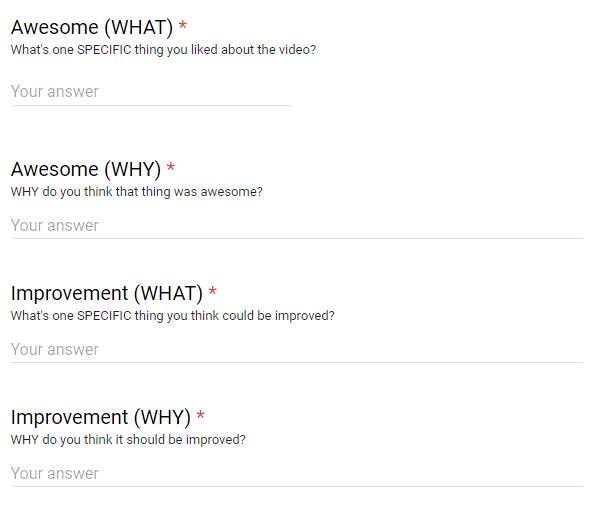
I capped it off with “Short Answer” Â questions that allowed students to offer some criticism.
After the critique is over I Â find the average for each category and then add the four categories up to get a score out of a possible twenty points. Critics get a score as well, earning one point for every three minutes of video graded.
 Of course this  has not always gone smoothly. There have been students that thought single word critiques, or pasting in the same sentence for each critique, were acceptable. One day when I was absent half the class invented time travel and managed to critique all the videos in  a tenth of the time it took to watch them.
I caught those students, because timestamps are a thing and I refused to treat this like something meant to save ME time and energy.
I’ll say that again: Letting students grade and critique student videos IS NOT faster than grading them myself.  I still have to watch the student videos  (why wouldn’t I?) and if anything I spend more time grading critiques than I did grading videos. I’m sure as I keep doing this I’ll find ways to streamline the process, but that doesn’t mean I’ll have more time for video games afterwards.
The goal was to get more students to start submitting their homework videos, and it’s working. My kids, with some exceptions, like writing comments when they know their classmates will read them. They like making movies when they know their classmates will write comments.
But what about the grades, you might ask? Won’t the students just give each other 5/5 on everything? There are a few that give incredibly high scores regardless, but with anonymous grading (on the student end – I see everything) and a class my size, it mostly averages out. Even if they did collude to give each other high marks, my homework grades are mandated by my district to count significantly less than my assessment or classwork grades.
Overall the scores are SLIGHTLY higher than what I’d give using the same rubric, but well made   videos still score higher than lower quality ones.
And they’re   getting better.
As a member of their audience, my students can take me or leave me. I’m far too old and out of touch with today’s youth for my opinion to mean much. But their peers? Those are opinions that mean something, and I’ve given my students enough training for them to point out what areas of technique need improvement.
So there you go. Your mileage may vary, but this setup seems to be working for me. All it costs is one class per week for critique and a significant portion of my planning time to organize and grade the  commentary, but the end result is students getting better at something they actually like to do.
That works for me.
 In the near future, I’m going to be sharing some spam with my students, and not for the reason you’d think I’d do it. While teaching how to tell the difference between actual important emails and unsolicited commercial and/or malicious emails is important, that won’t be the primary goal.
In addition to everything else I teach, part of my curriculum involves criticism. We as a culture of consumers frequently elevate critique itself into an art form – one so high that we generalize its practitioners into a league of toga-clad experts, giving thumbs up or down as various creative works battle it out in their arena. (The critics loved it! The critics panned it! The critics said it wouldn’t do well but look at the box office numbers, so what do they know?!)
You might think that things are different now that there are services that crowd-source ratings, and you’d be right. Rotten Tomatoes and Yelp are the first that come to mind, but Amazon’s reviews and YouTube’s Like and Dislike buttons also come in to play here.
Unfortunately, not all crowd-sourced criticisms are created equal. The goal of my upcoming lesson will be to improve how well my students articulate themselves when critiquing things they like or dislike.
The main example I intend to show will be a little gem from this very blog’s spam filter:

Seems like a nice bit of commentary. I mean, they’ve told me I have room for improvement, but they lead with something nice to say so the comment seems thoughtful and well-rounded.
What’s my point?
Guess which post they were commenting on.
This comment could more or less be attached to any of my posts where I explain something and still have it mostly make sense in context. There’s nothing in here to show that the person who wrote it actually read anything on my blog other than the tag line, and that we can only guess because their name and web address (which I censored since I’m not giving their college loan site free advertising) have something to do with education. OK, it was probably a bot that posted, but technically the bot still reads key words.
This is a common attribute for spam, but this is not something I expect from students.
I’ve recently ramped up the amount of time spent doing peer critiques in my Media Arts classes. The main setup is the subject of a blog post for another day, but one of the hurdles we have to navigate involves generic criticism.
It’s all well and good to say that you liked a video. It’s also OK if you say you didn’t like it, since not everyone has the same tastes.
But neither of those opinions works well in a critique setting if you don’t say WHY. The more my students dig down into their reasoning, the less likely they are to give criticism that would get caught in a spam filter.
That’s the goal, anyway.
We’ll see how well it works.
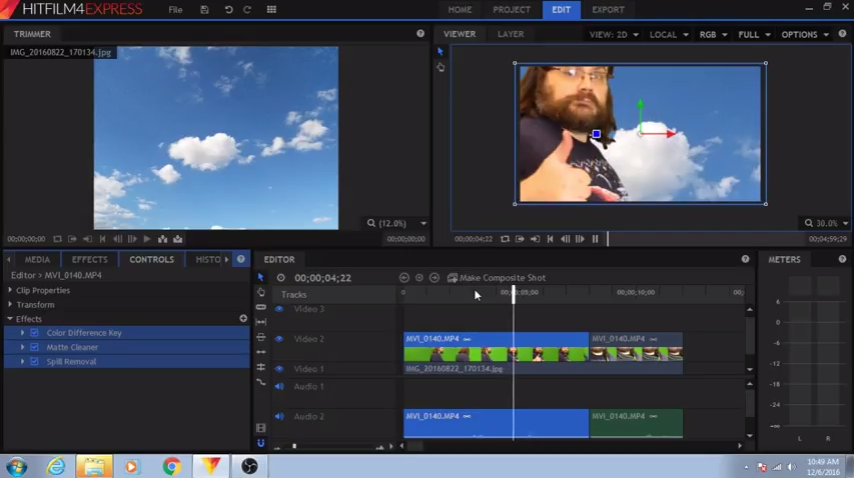
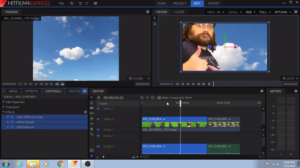 I blogged a while back about OpenShot, which is open source, cross-platform, and still not bad for some things. Are you stuck with 32bit computers? Use OpenShot. For everything else… use HitFilm Express.
HitFilm Express is a robust, cross-platform, non-linear video editor capable of rendering multiple tracks of audio and video, applying chroma key, moving/cropping where video appears on the screen, and a bunch of other effects that I’ve never needed.
Oh, and it’s 100% free. Free as in teachers should get their hands on this.
Now HitFilm DOES have a business model. They have a Pro version that does even more, and the Express version has special effect “add on packs” available for purchase, but I’ve personally never needed these. (WANTED is another verb that I could use, but then I’d be lying.)
Setup isn’t as straightforward as OpenShot, but it isn’t painful.
Hello,
Thank you for contacting HitFilm.
As a company we want to support the education of the next generation of filmmakers. We can provide you with a free license for HitFilm 4 Express, to cover as many computers as you need. We just need some information to get you set up.
Email address (Official school email only): https://hitfilm.com/register
School Name:
How many computers:
Mac or PC:
What country:
Please start by creating an account using the official school email you wish the licenses to be linked to. Then, if you can please submit a ticket from that account with the other info requested above, we can get you set up.
HitFilm 4 Express add on packs can not be accessed by the students or staff. Should a student or staff member want the add on packs, they will need to have their own personal account.Regards,
Axel WilkinsonFXhome Support
That’s right, while a personal account is limited, setting up a school account means this software can be on all of your computer lab’s machines for free. No more Adobe subscription fees for you!
The only downside is that the interface DOES take a little time to get used to it. Fortunately, I made a tutorial series to help you out.
 “It’s not the camera that takes the photo, it’s the photographer.”
This or something like it is said a lot by photographers. Sure, a really expensive camera can help, but give an experienced photog a point-and-click disposable film camera from a bygone era and they’ll still crank out a few shots worth remembering.
So I was kind of shocked when I, first learning the difference between taking a good photo and wasting developer fluid, learned that my camera was already doing some of the thinking for me.
You see, at some point, someone sat down and looked  at a whole bunch of good photos, then averaged the lights and darks and decided they equaled about 18% gray. I haven’t found evidence of this beyond what my photography teacher told me, but it’s a nice story.
What’s true, however, is that any camera sophisticated enough to have a built-in light meter looks at whatever’s coming through the lens and tries to over- or under-expose your shot to hit that 18%. This is why that shot you tried to take in a low light situation ended up more blurry than you expected, or why that image where a lamp was in the shot left everyone else in the picture looking like they were in a dark shadow.
More experienced photographers know this and adjust accordingly, sometimes using “gray cards” to help calibrate their cameras for shots that are more true to  the lighting situation on hand, but this is working AROUND the camera more than it is working with it.
Which brings me to this neat little article  on PetaPixel. Apparently light balance wasn’t enough, someone made a camera that does a lot more of the thinking for you.
The Trophy Camera is an experimental camera powered by artificial intelligence that can only shoot images that it deems to be “award-winning.â€
There’s a lot more to it than that. This invention is meant more as a statement on the more formulaic and “questionable” (to quote the inventor…) nature of photojournalism than a useful tool for amateur shutterbugs that can’t be bothered to learn which end to point at a subject.
The article is an interesting read with several useful links for more information, Â but it also brings to mind some common thoughts about education: There’s the right answer, then there’s everything else.
We fall into this trap all the time. Multiple choice answers are easier to grade, so that’s what we put on tests. Â We’re hardwired to look for differences, so it’s easier to grade worksheets when the finished ones all need to look the same.
This is fine, if you’re just pointing your camera at things and hoping it’ll go click.
… but what are you doing to get around making all of your students 18% gray? What’s your equivalent of a “gray card” in your classroom?
 This article on Mashable reads like it was written by a petulant teen.
Schools may provide students with a wealth of academic knowledge, but do they really think they have what it takes to outsmart children when it comes to social media?
What’s worse is … they’re kind of right. While many educators are more forward thinking about cell phone use in the classroom, there are a lot of old school (pun intended) individuals that see any distraction as an affront to their station and duty.
Problem is, fighting against social media use (or cell use in general) is like holding back the tide with a sieve. You’re better off harnessing that power for good and building lessons around its use.

TL:DR: IÂ haven’t banned fidget spinners yet, and I don’t expect that I’ll have to do so.
Long version:
Spinners: Kids love them, teachers demonize them. They’re a distraction! They’re disrupting the classroom! They’re fine for autistic kids, but to everyone else, they’re toys! I won’t have them in my classroom! We’ve banned them on the district level, and good riddance!
… sound familiar?
Like any thing else that comes around and finds its way into a school setting overnight (remember the era before dabbing was a thing?), we teachers seem to get polarized  in less than half that time.
And I really don’t mind   seeing them in my computer lab.
Look, I’ve banned all kinds of things in there. Food, drinks, gum, and lip gloss are forbidden items. I’ve had too many close calls (including one harrowing event involving a tube of petroleum jelly lip balm) for me to feel comfortable allowing them near the school equipment. But spinners? Really?
“But they’re a distraction,” you say. “My students won’t do their work if they have these.”
Yes, you’re absolutely right. A fidget designed to help keep autistic children attentive  does the exact opposite when placed in the hands of anyone not on the spectrum. OR, and this is just me thinking back to my own experiences, maybe sometimes accommodations for those who need them most can also benefit those who need them slightly less.
In my youth, shortly after the invention of paper, it was a commonly held belief that doodling was a sign that a student was off task. My high school visual arts teacher encouraged us to doodle  in our notebooks during other classes for purely selfish reasons (more drawing meant increased skill), and we readily agreed because one authority figure telling us to ignore another authority figure was more or less a teenager’s idea of heaven.
It turns out that my old visual arts teacher was ahead of his time, and doodling in my more difficult classes may have helped more than it hurt. I won’t be so bold as to say that he saw this coming, but I do know that I’m more likely to remember details if I’m doing something with my hands.
Which brings us back to spinners. A student with a spinner in my lab is most likely going to play with it until I tell them to stop, and maybe not even then. While they’re doing that, there’s a few things they’re less likely to be doing:
The list could go on if I really wanted to inflate my word count. All of these are things I have to deal with on a not uncommon basis, but they’re in decline among the students who bring spinners to class.
Oddly enough, the spinners seem to be distracting students from other forms of distraction.Â
My point here is that whatever the perceived distraction, it’s something that causes much smaller hassles  than the other things a child will do when they feel the need to do SOMETHING other than sit perfectly still and stare at whichever wall we’re using with the projector.
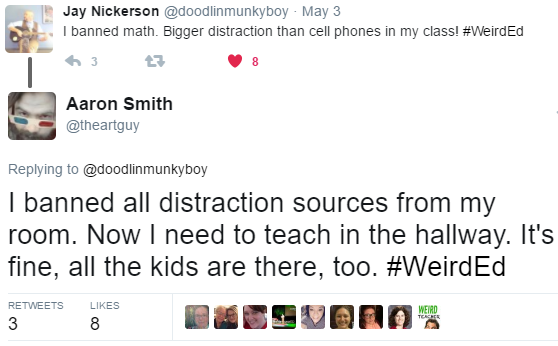
So far, I’ve taken exactly one spinner from a student. In his case it certainly was a distraction, and he didn’t get started on his project until after his spinner was in my back pocket. This same child has used his chair and desk as distractions before. The spinner wasn’t the lowest common denominator here.
I won’t judge you. If you don’t like spinners, don’t allow them in your room. I don’t like when students sing off-key to the songs playing through their headphones, so I don’t allow that. Just don’t insist that it’s  ruining your ability to provide instruction.
Meanwhile, I’ll be over here making my ballpoint pen click over and over again. Not all of us prefer fidgets that spin.
 Teachers all have their pet peeves, rules that are not to be broken at any cost. At this point I think I’ve taught enough Media Arts curriculum to list mine. I plan to print these out and put them on my wall for next year.
What are your classroom commandments?
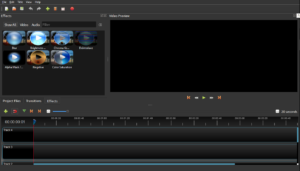 TL;DR: OpenShot is a free video editor that supports multiple tracks and chroma key. Try it out.
I’ve been an off-and-on-again fan of Linux for years (decades?), but one of the things that always had me come crawling back was the lack of decent video editing software. (And video games, but that’s another blog post.) (Yes I know about WINE, but it doesn’t work for everything and it adds extra steps that complicate things for younger students.) When I taught Visual Arts it wasn’t that big a deal, but now that I teach Media Arts, well, it’s kind of mandatory that I be able to edit video.
Now the word “decent” is rather important here. I’d tried some open source and web based video editors in the past, but of those that worked, none provided the features that I considered mandatory for a Media Arts classroom.
Then lo and behold, one day I had a Twitter conversation with Phil Shapiro. If you’re not following Mr. Shapiro, you might want to correct that mistake. He’s a librarian who frequently arms himself with metaphors and wordplay, making anyone’s Twitter timeline much better for the effort.
He is also the biggest proponent of open source software I’ve seen in a VERY long time, bragging about $20 laptops that he makes serviceable by removing Windows XP and replacing it with Linux Mint. (Although maybe a different flavor of Linux is in order now? I like PuppyLinux for very ancient machines, myself…)
In any case, Phil’s wit and love of all things maker/open source and my own laments about video editing led to this:
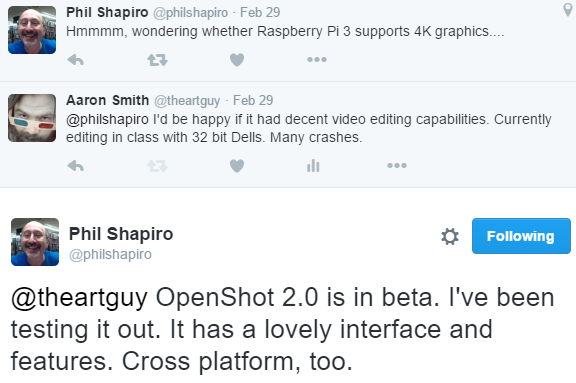
Wait, what’s this? A free video editor that doesn’t suck? I mean, HitFilm Express is free and quite good, but you still need to register an account to use it (ruling out most of my students as they are under 13), you get one install per person (ruling out my ability to install it on every computer in my lab), and it only runs on 64 bit machines (ALSO ruling out my ability to install it on all the things).
OpenShot has the same price tag as HitFilm and maybe not as many bells and whistles, but what it lacks in 3D composite shots it makes up for in its low-powered goodness. OpenShot easily handles multiple tracks of video and even does chroma key, which is something not frequently seen in a free editor.
![2016-05-23 10_52_01-Untitled Project [HDV 720 24p] - OpenShot Video Editor](https://academicaesthetic.com/wp-content/uploads/2016/05/2016-05-23-10_52_01-Untitled-Project-HDV-720-24p-OpenShot-Video-Editor.png) Like all software there is something of a learning curve, but for OpenShot the main hurdle is understanding that you right-click on a clip to split it at the play head. Most of the rest of it is quite intuitive.
Like all software there is something of a learning curve, but for OpenShot the main hurdle is understanding that you right-click on a clip to split it at the play head. Most of the rest of it is quite intuitive.
While OpenShot truly shines when run under Ubuntu Linux (32 bit Linux seems to make better use of system resources than 32 bit Windows, so programs like OpenShot have more room to stretch their legs), it also works reasonably well on Mac and Windows and, as it’s a free, open source program, there’s nothing preventing me from installing it on every computer in my lab.
Many of my students are still addicted to Camtasia in spite of its crashes (TechSmith tech support tells me it would edit HD video better if only I replaced my lab with 64 bit computers… Thanks, TechSmith.), but I hope to slowly wean them away from paid software and towards free and legal alternatives for the same reason that we’ve NEVER used an Adobe branded editor … ever.
I want students to be able to take what they learn in my class and be able to use it at home. Some of them have parents willing to spend $100 or more on software (or in the case of Adobe products, MUCH more than that as a subscription service so when you stop paying the software stops working), but most of them don’t. Those that do, I’d rather they invested that in nice hardware: computers, microphones, and cameras.
I’ll admit that when it comes to the Open Source movement I am far from a purist. My main draw (even now)Â is the idea that I can get something useful without having to pay an arm and a leg for it. Blame it on my salary as an educator, or perhaps my Visual Arts background (art teachers can make a lesson out of almost ANY material, particularly if it’s salvaged or donated), but if I can get it for free without breaking any laws, then I’m all for it.
OpenShot fits the bill for me. If you do anything that involves students editing video, you should try it out as well.
… now if only there was a decent way to edit video with a ChromeBook…
Come by #BYOTchat on Twitter! This Thursday at 9PM EST! More exclamation points!